note
Affiliate disclosure: this review contains affiliate links to ClickDesigns. If you buy through one, I earn a commission at no extra cost to you.
Nobody paid for this review, I was not given a free copy, and nothing critical below was softened for the commission. How I handle affiliate links is covered in the disclaimer.
ClickDesigns sells itself as a $67 lifetime deal on graphic design software for people who cannot use Photoshop and do not want to pay a freelancer.
I opened the vendor's own pricing page to check that number and found something the sales page never mentions. The same company sells the same software as a subscription at $20 to $49 a month, with a free trial, and with the artificial intelligence features metered by the month.
Then I checked the offer page against the Internet Archive. The line "Today ONLY $67" has been sitting there, unchanged, since 20 November 2022.
That is 1,405 days of the same today.
This ClickDesigns review works through the whole offer that way. Sales page on one side, the vendor's own pricing page, terms, support desk and checkout on the other, with the dates I checked each one.
The short version is that the software is real and the price is genuinely low, but the page selling it to you was written for a product that has since moved on without it.
Is ClickDesigns worth it? The short answer
ClickDesigns is worth the $47 one-time price if you need 3D product mockups, box shots and cover art, and if a 2022 feature set is enough for you. It is poor value if you want the AI tools, because those belong to the separate subscription the same vendor sells at $20 to $49 a month.
ClickDesigns is worth $47 if you specifically want 3D product mockups, box shots, bundle shots and cover art, you are happy with a 2022 feature set, and you treat the one-time payment as buying a mockup generator rather than a full design suite.
It is not worth it if you are buying because of the artificial intelligence features. The page charging you $47 does not mention AI once, while the vendor's public product is built around it and meters it monthly.
And it is the wrong first move entirely if you have not tried the software yet, because the vendor gives away a free trial on its own site that the $47 sales page never tells you about.
The product and the company are real, and the ClickBank refund is dependable. What is not dependable is the sales page, unchanged in nearly four years and priced against a $697 figure the vendor charges nobody.
ClickDesigns at a glance
The specification, assembled from the vendor's own pages and its ClickBank checkout on 25 September 2026, not from other reviews.
- Advertised price: $67 one time, from a stated "Regular Price $697/Year".
- Price actually charged: $47, on the sales page's own buy button, before any coupon.
- Upgrades behind the front end: $297 Suite, $77 Mockups, $97 Maximizer, $97 Design Pages, $197 Agency. $812 for everything.
- The same software on the public site: $20, $30 or $49 a month, or $15, $24 or $42 a month billed annually.
- Free trial: yes on the public site, no credit card required. Not mentioned on the ClickBank page.
- What the $47 tier lists: drag and drop editor, thousands of templates across 28 niche categories, logos, 2D and 3D box shots, book covers, reports, device mockups, group shots, royalty free assets, commercial rights, video training.
- AI tools: metered at 100, 500 or 1,000 uses a month on the subscription. Mentioned zero times on the $47 page.
- Design ownership: yours, confirmed by the vendor's support desk.
- Refund: 30 days through ClickBank. The vendor's own terms set out no refund right at all.
- Vendor: 123 Click Limited, London, company number 14662523.
Three of those lines appear nowhere in the marketing: the real $47 charge, the $812 upgrade ladder, and the free trial sitting on the vendor's own website.
ClickDesigns pros and cons
Drawn from the evidence below rather than from the sales page.
What ClickDesigns gets right:
- A genuinely low one-time price. $47 against $20 to $49 a month for the same vendor's subscription is real money saved, if the older feature set suits you.
- Mockups are the standout. 3D box shots, device screens, bundles and packaging, with perspective and lighting handled for you. This is the feature buyers consistently praise.
- You own what you make. The support desk is unambiguous: "YOU DO! ... no one can use it without your permission, not even us."
- Assets are royalty free with no attribution. Confirmed in the vendor's own documentation.
- Commercial rights are included at the front end, which is not true of every tool in this price bracket.
- No fake countdown. The offer page carries clock graphics but no timer code at all. Given what this category usually does, that deserves saying.
- A real, registered company with a published support desk that answers questions straight.
What ClickDesigns gets wrong:
- The sales page is nearly four years stale. Identical offer text since November 2022.
- The $697 a year anchor matches nothing. The vendor's own annual plans list at $360, $576 and $1,008.
- It advertises $67 and charges $47. Whatever the reason, the page and the till disagree.
- Five paid upgrades, none of them named on the sales page. Including a $297 order bump with no description of what it is.
- Paying by instalments costs 2.3 times as much. $33 down plus two payments of $37 is $107, against $47 once.
- The vendor's terms grant no refund. The heading says Return and Refund Policy. The text sets out no window and no right.
- The free trial is hidden from the people being asked to pay.
- Buyer evidence is too thin to lean on. Four Trustpilot reviews and two on Capterra.
How I researched this ClickDesigns review
I have not spent six months producing client graphics in ClickDesigns, and reviews that imply otherwise are why this whole category reads as untrustworthy.
What I did instead is check every claim against a document the vendor did not write in order to sell you something.
That meant reading the ClickBank sales page line by line, then opening the vendor's own public pricing page, which is written for people who are already customers and is consequently far more candid about what the software does and does not include.
It meant reading the Terms of Service and the support knowledge base in full, pulling the company record from Companies House, and loading the ClickBank checkout itself to read the prices, the tax line and the refund window as a buyer would see them.
It also meant running the offer page through the Internet Archive across eight snapshots going back to 2022, which is where the central finding came from.
No free copy was given and nobody paid for this review. Where a figure is an estimate I say so. Where something is reported by buyers rather than verified by me, I attribute it in the sentence.
It is the same method I used on Paying Social Media Jobs, where the vendor's own earnings disclaimer contradicted the headline on its own landing page.
What ClickDesigns actually is
ClickDesigns is a browser based design tool aimed at digital marketers rather than at designers.
The pitch is narrow and, to its credit, honest about its own audience. You are not being sold a Photoshop replacement. You are being sold a way to produce the specific graphics that a marketing funnel needs.
That means logos and favicons, 2D and 3D box shots, book and report covers, device mockups on monitors, laptops, tablets, phones and watches, product bundles and group shots, plus the small parts of a sales page: headlines, buttons, testimonial blocks, badges, coupons and guarantee seals.
The templates are organised into 28 niche categories, so you pick a use case first and a design second. The library also runs to ecommerce store templates for Shopify, Etsy and Amazon, KDP publishing covers, video thumbnails and print ready business stationery.
Where it genuinely differs from a general purpose editor is the 3D mockup engine. Wrapping a flat cover image around a rendered box, a phone screen or a stack of products, with the perspective and lighting resolved automatically, is fiddly work in a normal editor and quick here.
Google's own AI Overview for the branded search identifies the same thing, calling 3D box shots, device screens, bundles and packaging "the standout feature".
It is also built to feed a sales funnel rather than to stand alone. The vendor publishes platform specific pages for ClickFunnels, GoHighLevel, Groove and Convertri, and the AI Overview lists WordPress, Shopify, Wix and WooCommerce among its integrations.
The rest of the toolset is ordinary: a drag and drop canvas, shapes, icons, fonts, stock photography, masking, filters and a colour picker.
Who is behind ClickDesigns
The vendor is 123 Click Limited, registered in England and Wales under company number 14662523, at 128 City Road, London.
Companies House lists a single officer, Mohammad Latif, who holds both the director and secretary roles, appointed on 14 February 2023, British, with a place of residence recorded as the United Kingdom. That matches the "Mo Latif" name that Google's AI Overview attributes the product to.
Two details are worth recording without overstating them.
The first is that the company was incorporated on 14 February 2023, while the offer page selling this product was already live and archived on 20 November 2022, and the ClickBank listing dates to June 2022. The entity named in the terms postdates the product by months. Companies restructure, so this is context rather than an accusation.
The second is a straight contradiction inside the vendor's own paperwork. The Terms of Service define the relevant country as "where ClickDesigns or the owners/founders of ClickDesigns are based, in this case is United Arab Emirates", while the UK statutory register records the sole officer as resident in the United Kingdom.
Those terms were last updated on 22 November 2023, which is 1,038 days before I checked them. The staleness is the pattern here, and it repeats everywhere in this offer.
How the ClickDesigns workflow actually goes
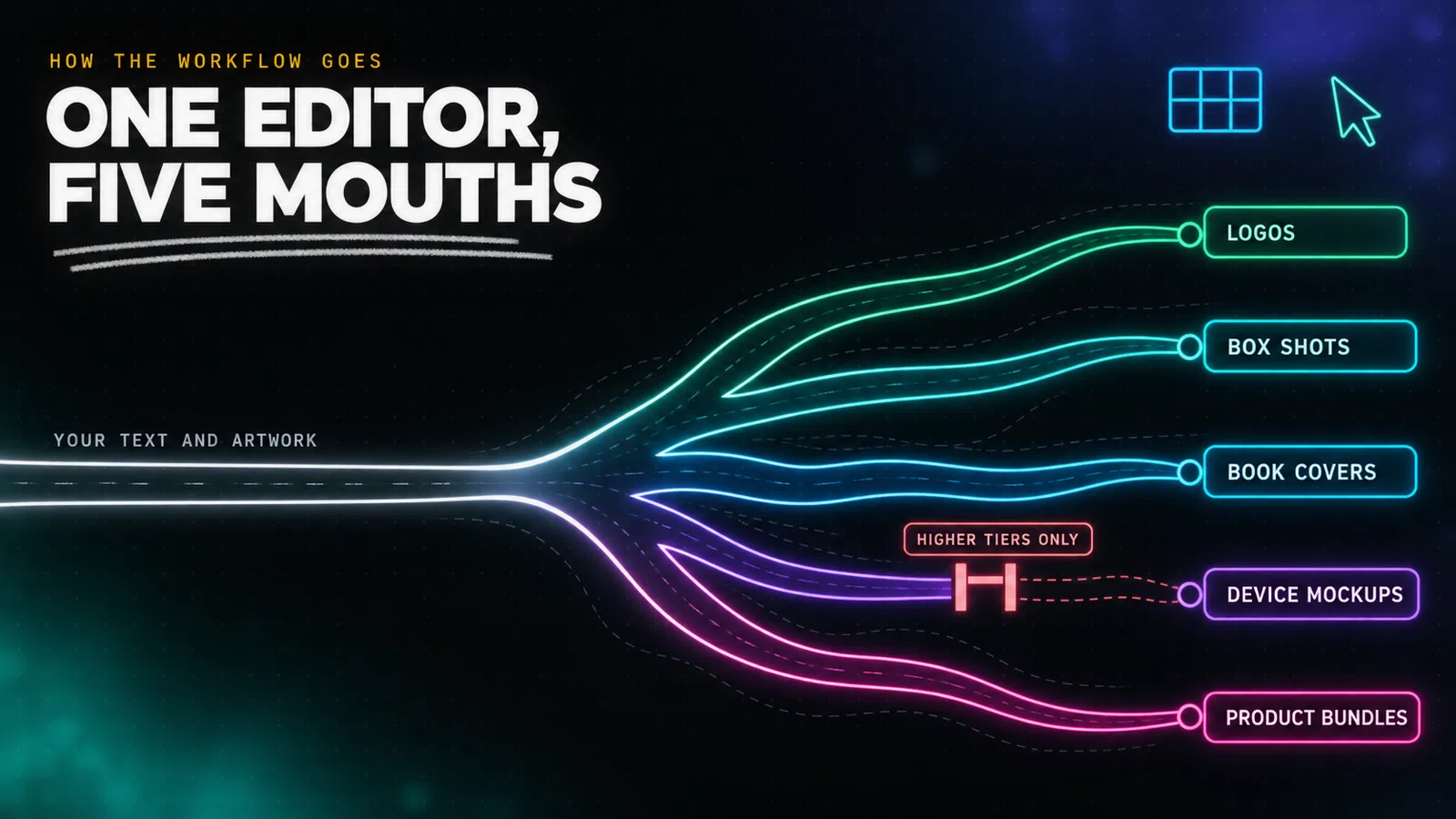
The working loop is short, which is the entire point of the product.
Step one, pick a category. You choose what you are making before you choose how it looks: a logo, a box shot, a book cover, a device mockup, a bundle.
Step two, pick a template and swap the contents. Replace the placeholder text with your own, drop in your logo or photograph, adjust colours. The templates are built so that the layout holds while the contents change.
Step three, export. PNG and JPEG on every tier, with PDF, GIF, WebM, WebP and MP4 appearing on higher plans, and print ready CMYK at 300 DPI.
For the mockup work there is a fourth step, and it is the one that sells the product. You supply a flat image, choose a 3D object, and the renderer wraps your artwork onto it.
The honest limitation is the same one that every template driven tool has. You are assembling, not designing. Move far from what a template intends and the layout fights you, which is exactly what reviewers who come from real design software report.
Google's AI Overview puts the same criticism more gently, noting that advanced designers may find the vector and layout manipulation "a bit restrictive or basic compared to full design suites", and that the logo templates in particular can look "template-built".
That is a fair description. It is a marketing asset generator, and judged as one it does its job.
ClickDesigns is sold as two different products at the same time
This is the finding the rest of the review rests on, and it is checkable in about four minutes.
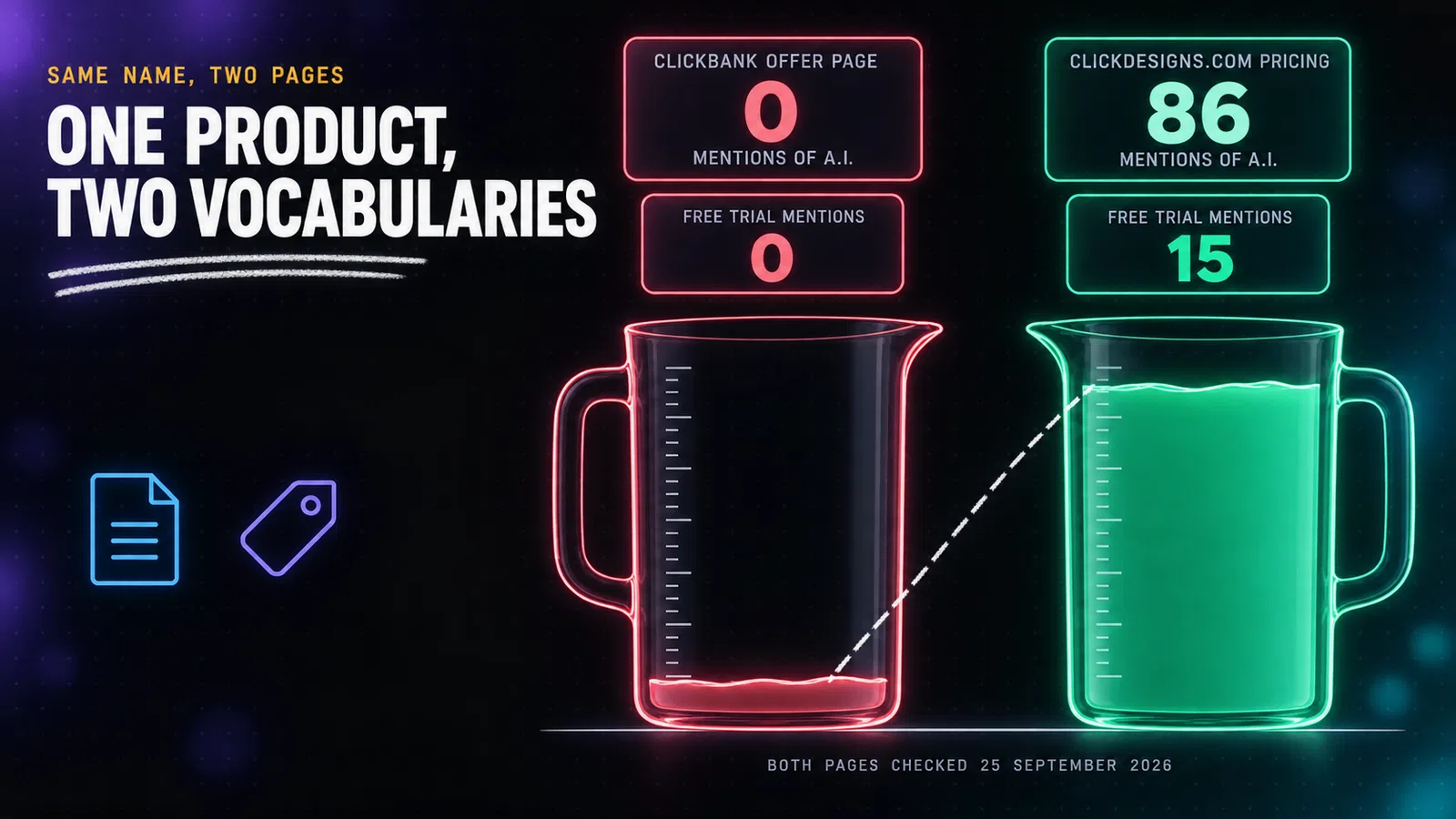
The page that takes your $47 and the page that takes your $20 a month are not describing the same software.I counted the vocabulary on both, on 25 September 2026. The ClickBank offer page mentions artificial intelligence zero times. The vendor's public pricing page mentions it 86 times.
The offer page says "lifetime" three times. The public pricing page says it not once.
The public page offers a free trial fifteen times over. The offer page, none.
The words "projects" and "cloud storage", which is how the subscription meters what you get, appear zero times on the page charging $47 and eight times each on the public one.
That is not a difference of emphasis. It is two different products wearing one name, and it is the single fact that every other ClickDesigns review on page one has missed.
What the public site actually sells. Standard at $20 a month, Pro at $30, Expert at $49, listed against $40, $60 and $99. Billed annually they fall to $15, $24 and $42 a month. Every tier carries a free trial with no credit card required.
And every tier is metered: AI tools capped at 100, 500 or 1,000 uses a month, projects capped at 50, 100 or unlimited, cloud storage at 10GB, 100GB or 1TB.
What the ClickBank page sells. "NO MONTHLY OR ANNUAL FEES | LIFETIME UNLIMITED USE", against a "Regular Price $697/Year", with a feature list of templates, mockups and commercial rights, and no mention of a cap on anything because it predates the metering.
The support desk quietly confirms the split. Its article on finding your AI tools opens by saying they are "automatically added to your account upon upgrading".
There is one more line on the offer page that settles it. Directly above the buy button, the page warns: "you must act now because the price will soon change to a monthly subscription without notice."
The price did change to a monthly subscription. That happened on the vendor's public site, years ago. The offer page simply never found out.
The same software is also sold as GrooveDesignerPro
There is a third face to this product, and the vendor's own support desk is the thing that gives it away.
The knowledge base article explaining where to find your AI tools contains this sentence: "You will be using your existing ClickDesigns/GrooveDesignerPro account to access these."
That is one support article, serving two brand names, treating the accounts as the same thing.
Follow it and the picture fills in. groovedesignerpro.com resolves to a live site, which I loaded on 25 September 2026, under the title "GrooveDesignerPro Graphics & Designs Made Easy". ClickDesigns' own page title is "ClickDesigns Graphics & Designs Made Easy".
The support desk itself carries a dedicated GrooveDesignerPro category, sitting in the same sidebar as the ClickDesigns articles, on the same help centre.
The vendor makes no secret of the adjacency elsewhere either. Its public site lists platform specific pages for Groove, Convertri, GoHighLevel and ClickFunnels, so the software is plainly built to be dropped into other people's funnel builders.
I want to be careful about what this does and does not prove. I have not compared the two products feature by feature, and I am not going to tell you they are byte for byte identical when I have not checked.
What the vendor's own documentation establishes is narrower and still worth knowing: one support desk, one account system, and two brand names on the same underlying editor.
Why it matters to a buyer is practical. If you are comparing offers and you find what looks like a competing design tool at a different price under a different name, check whether you are looking at the same software before you treat it as an alternative.
It also explains the shape of everything else in this review. A product sold under several brands, through four affiliate networks, on a funnel page and a subscription site at once, accumulates exactly the kind of drift that leaves a 2022 sales page selling a 2026 product.
ClickDesigns pricing: what you actually pay
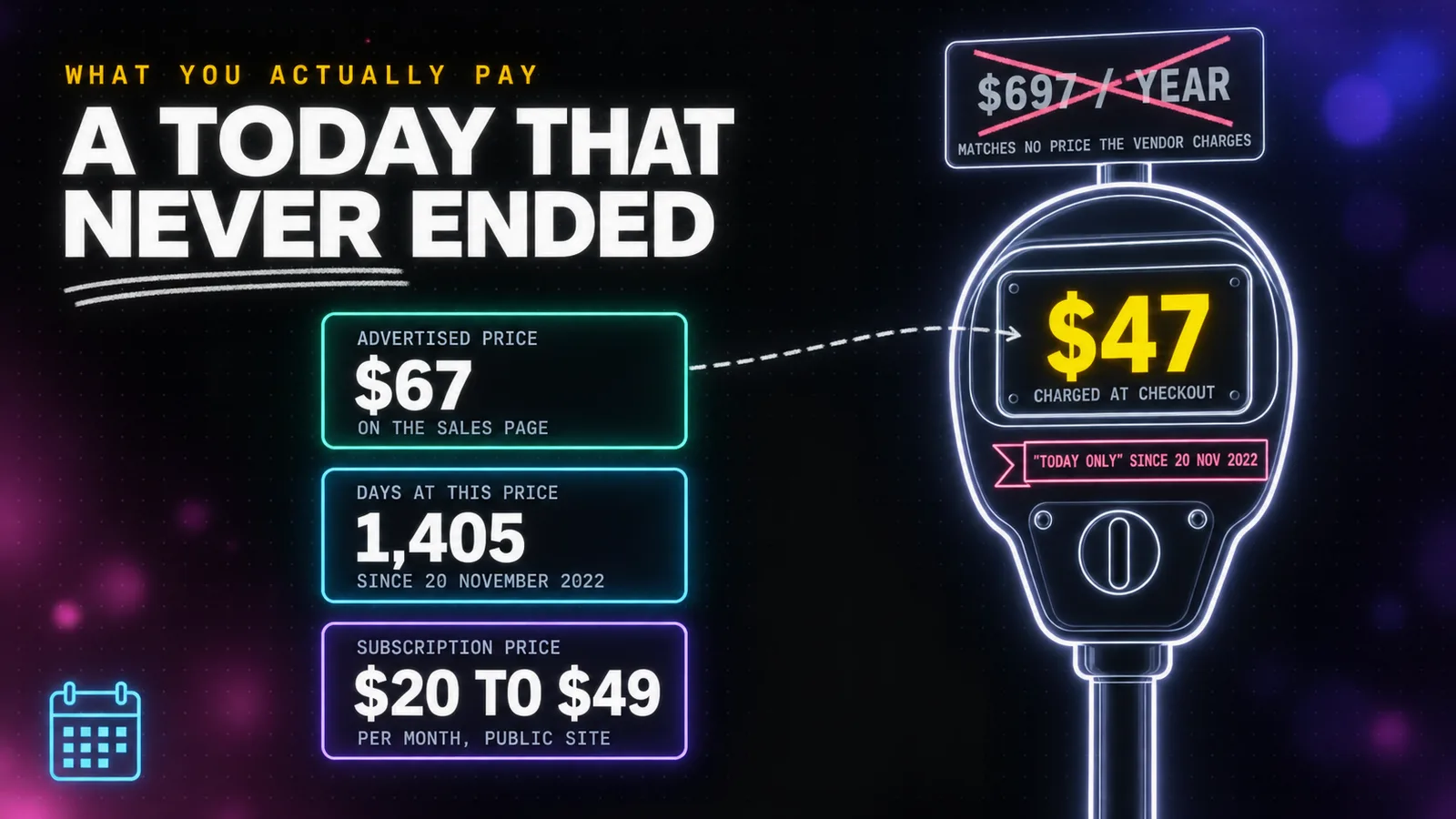
The advertised price is $67. The price the page's own button charges is $47.
I loaded the checkout link printed on the ClickDesigns sales page, entered no coupon, and the cart came back at $47 for "ClickDesigns Commercial". The page also advertises a coupon code, CD20OFF, for "$20 OFF", and $67 minus $20 is $47.
So whatever the intention, the buyer who never types the code pays what the coupon promises. I tried to apply the code to confirm the behaviour and the checkout's Apply button stayed disabled, so I cannot tell you what it does. What I can tell you is what the till charges without it.
Now the anchor. The offer page prices $67 against a "Regular Price $697/Year".
No such price exists. The vendor's own annual plans list at $360, $576 and $1,008 before discount, and at $180, $288 and $504 after it. Its monthly plans list at $40, $60 and $99. The number $697 appears nowhere except as the thing your discount is measured from.
This is the same reverse engineered discount that ran through the AI Media Machine review, where a "regular price" was inflated to justify a sale that never ended.
The staleness goes deeper than the price. The public pricing page's promotional banner, live when I loaded it on 25 September 2026, still reads "Cyber Week 2024" above the words "CYBER WEEK Deal Expires in:". The permanent half price offer is labelled as a holiday sale from two years ago.
On the same page, the string "(SAVE $731.88/year)" is printed on two different plans whose actual annual savings are $180 and $288. It is a template value that was never filled in, sitting on a live checkout page.
For buyers in India, the ClickBank order form on 25 September 2026 showed Rs 5,030.88 plus Rs 905.56 tax, a total of Rs 5,936.44. That tax line is exactly 18.00% GST. The implied exchange rate is 107.04 rupees to the dollar against a market rate of 96.02 the same day, an 11.5% spread, so the delivered cost is about $61.83 on a $47 sticker, roughly 31% over. The charge appears as CLKBANK*ClickDesigns.
That is the fourth vendor reviewed here to land within a point of 32% for Indian buyers, so it is a platform pattern rather than a vendor choice.
The upsell ladder, mapped before you hit checkout
The $47 is the doorway, not the room.
I read the ladder directly off the ClickBank checkout rather than from any page the vendor shows you. Every item resolves to an exact round dollar at the same exchange rate, which is what makes the figures reliable.
- Front end: ClickDesigns Commercial, $47.
- Order bump at checkout: ClickDesigns Suite, $297.
- ClickDesigns Mockups, $77.
- ClickDesigns Maximizer, $97.
- ClickDesigns Design Pages, $97.
- ClickDesigns Agency, $197.
Say yes to all of it and you have spent $812 on a product you were introduced to at $47.
Here is the part that matters. Not one of these upsells is named on the sales page: the words "Suite", "Maximizer", "Agency" and "Design Pages" appear zero times on it. Nothing you read before paying tells you the upsell ladder exists.
The $297 order bump is the sharpest example. It appears on the payment screen as a single line, "Include ClickDesigns Suite to my purchase for only $297 right now", with no description of what the Suite is. You are asked for six times the front end price for a product the checkout never explains.
The Agency tier at $197 has a tell worth knowing. The support desk publishes an article called "How To Create Your Watermark Even Without The Agency Feature", which is a helpful piece of writing and also a confirmation that watermarking your own work sits behind a $197 upgrade.
There is also an instalment option, and it is expensive. The checkout offers ClickDesigns Commercial at $33 down plus two monthly payments of $37, which totals $107.
That is 2.3 times the $47 one-time price for the identical product. If you buy this, pay once.
tip
If you do buy, decline everything at checkout. Nothing in the upgrade ladder is described well enough on the payment screen to make an informed decision, and every one of them can be bought later from inside the account. The support desk publishes a short article on upgrading from the profile screen.
The limits the ClickDesigns sales page never mentions
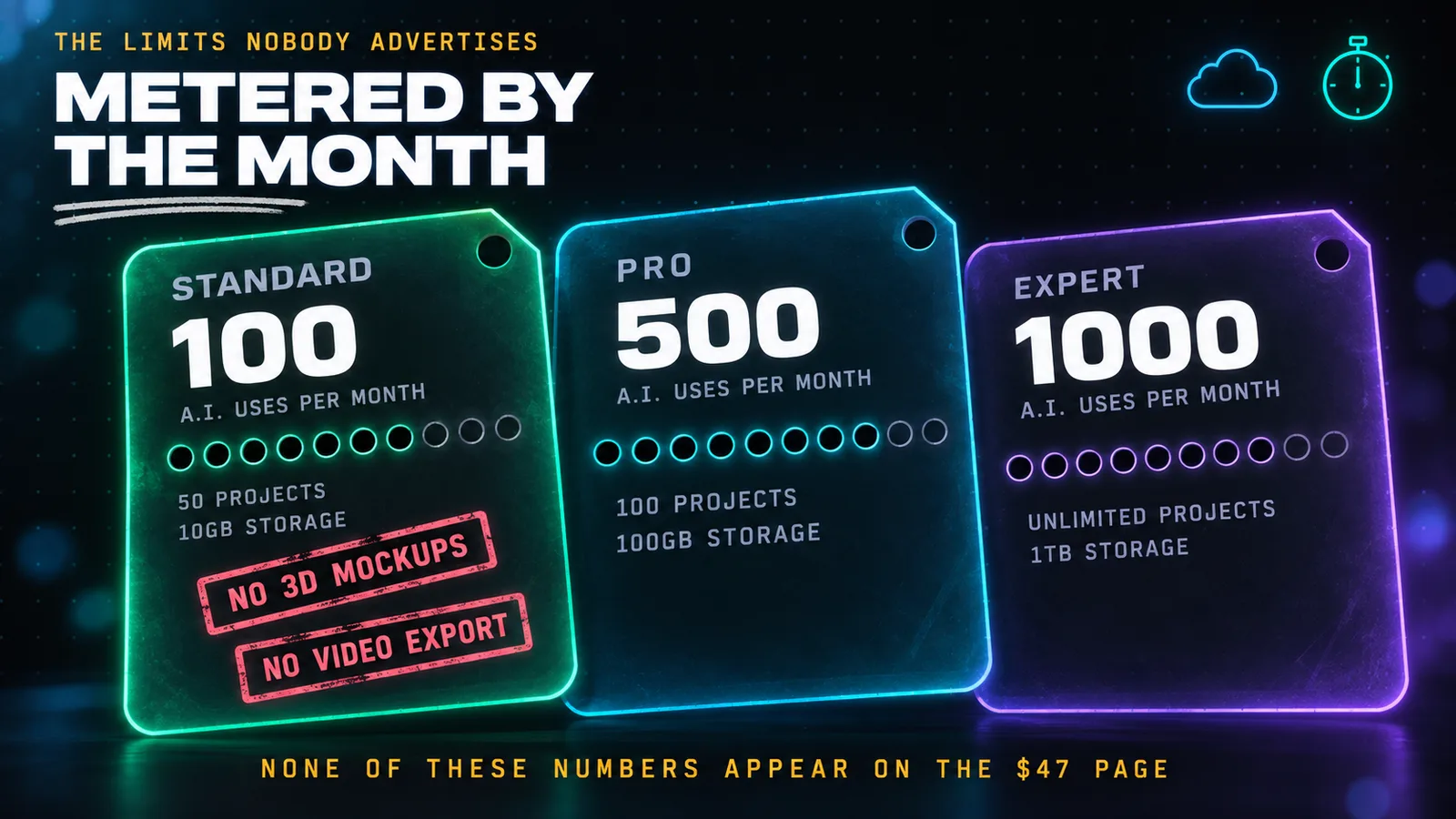
Every limit in this product lives on the page you do not read before paying.
The AI tools are metered by the month. Not by the design, not by the project, by the month: 100 uses on Standard, 500 on Pro, 1,000 on Expert. Run out and you wait for the calendar.
Projects are capped too. Fifty on the entry plan, one hundred on the middle one, unlimited only on the $49 a month tier.
So is storage, at 10GB, 100GB and 1TB.
Export formats are tiered. PNG, JPEG and PDF at the bottom. GIF, WebM, WebP and MP4 only from the middle plan up. If you need animated or video output, the cheapest plan does not produce it.
3D is not on the entry tier. The 3D cover and mockup creator, 3D bundles and sets, and mockup link sharing all start on Pro. Given that 3D mockups are the reason most people are interested in this software, that is the single most important line on the pricing page.
Some ordinary tools are gated as well. The drawing tool and the QR code generator are both marked unavailable on the entry plan.
None of these numbers appear on the $47 page. That page does not mention projects, storage, AI uses or monthly limits at all, because it was written before any of them existed.
Which leaves the question I cannot answer for you from public documents: what does the $47 lifetime licence map to? The feature list it prints looks like the 2022 product, and the support desk says AI tools arrive "upon upgrading".
I am not going to guess, and no other review of this product has asked the question. If you buy, ask support to confirm in writing which current tier your lifetime licence corresponds to, and whether the AI usage allowance applies to it, before your 30 days run out.
Does ClickDesigns actually work?
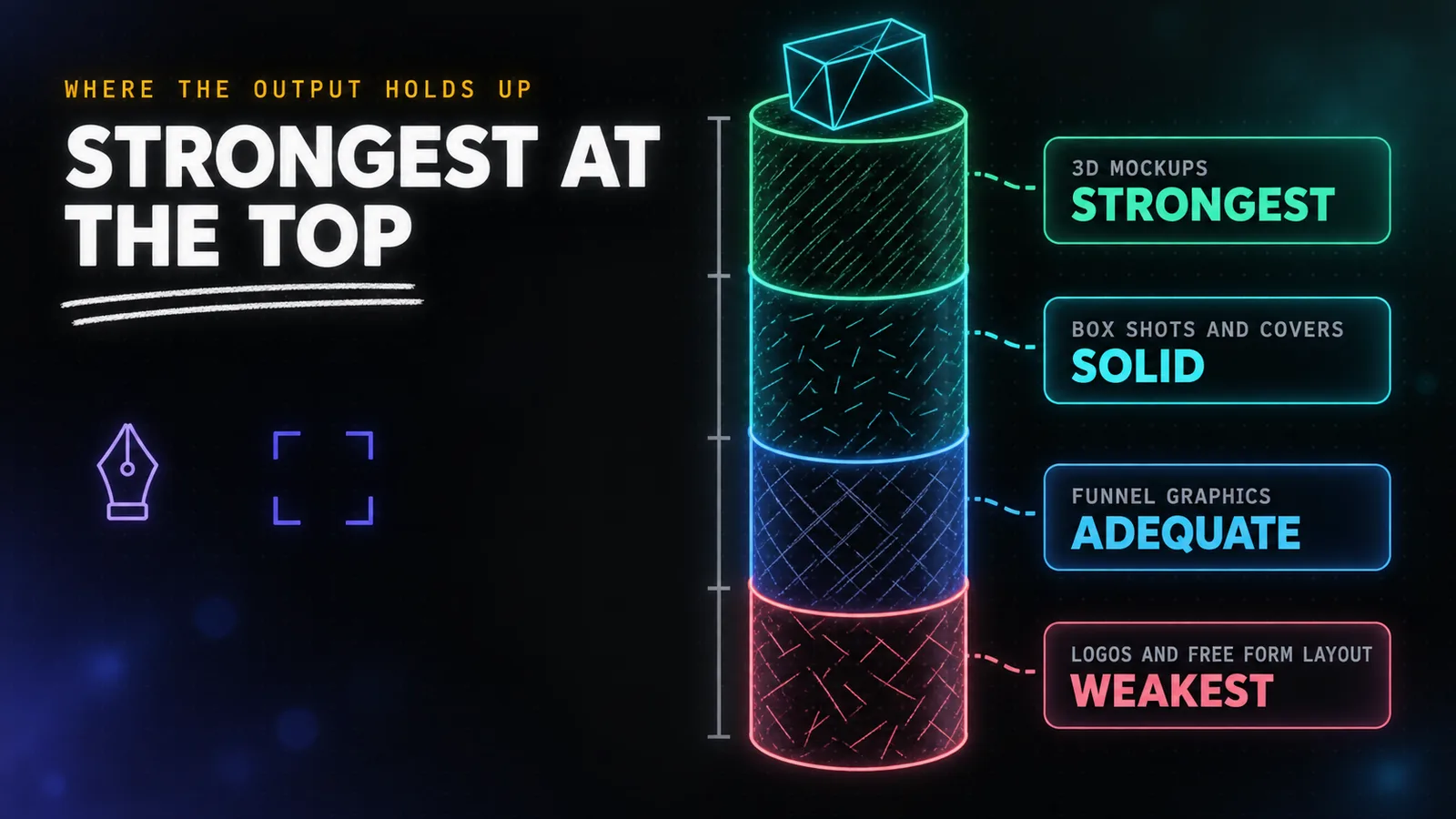
Yes, ClickDesigns produces usable graphics, but the quality varies sharply by output type. Its 3D mockups, box shots and covers are genuinely strong, because the template carries the composition. Logos and free form layouts are the weak point, where reviewers consistently report results that look template built rather than designed.
I want to be precise about the basis for this section, because it is the part of a review most often faked. I have not run a paid account. What follows is drawn from the vendor's published output, the feature specifications on its pricing page, and the consistent themes across the buyer reviews and video walkthroughs that exist.
Mockups are the strongest output. This is the one thing every source agrees on, including the reviewers who are otherwise unimpressed. Rendering a believable 3D box, a device screen or a product bundle from a flat image is genuinely faster here than doing it by hand, and the lighting and perspective hold up.
Covers and box shots are solid, for the same reason. The template carries the composition and you supply the artwork.
Funnel graphics are adequate. Buttons, badges, testimonial blocks, guarantee seals and coupons are simple objects, and simple objects come out fine.
Logos are the weak point. Google's AI Overview, summarising the published reviews, puts it plainly: the logo designs "can look somewhat generic or template-built, making them less ideal for long-term brand identity". A logo is the one asset where looking template built defeats the purpose.
Free form layout is where it struggles. Every tool of this shape trades flexibility for speed, and the further you move from what a template intends, the more the editor resists.
There is a straightforward way to test all of this yourself at no cost, which the $47 page does not tell you about, and it is the subject of the next section.
Can you use ClickDesigns free?
Yes. Every plan on the vendor's public site carries a "Try it for free" button and the words "No credit card required", language that appears fifteen times on that one page. The ClickBank offer page selling the $47 lifetime licence does not mention the free trial once.
That gap matters because it means the whole question can be settled before any money moves.
I want to be fair about what that free trial is and is not. It is a trial of the subscription product, the current one with the AI tools and the metering. It is not a free version of the $47 lifetime licence, and the vendor publishes no free forever tier.
But it is the right first move regardless, because the thing you actually need to know before spending anything is whether this editor suits the way you work. Fifteen minutes inside it answers that better than any review, including this one.
It also lets you check the specific thing you are probably buying it for. Make a 3D box shot, then wrap a cover onto a device.
If the mockup engine does what you need, you have learned the one fact that justifies the purchase.
Worth noting for completeness: Capterra's listing for ClickDesigns, last updated 17 September 2026, records "Free trial: not available" and "Free version not included", and prices the product at 69 pounds a month. All three of those contradict the vendor's own pricing page. The listing carries two reviews.
The resale pitch on the ClickDesigns sales page
Halfway down the offer page, the product stops being sold as a design tool and starts being sold as an income.
The section is headed "Create. Sell. Repeat. The 3 Step, Cash-On-Demand Blueprint REVEALED!" and it opens by offering "a ONCE-IN-A-LIFETIME, extraordinary opportunity to tap into a $45.8 BILLION dollar industry tonight."
What follows is titled "The EASIEST 3 STEP Money-Printing BLUEPRINT", and it is worth quoting because the wording is the point.
Step one: get the Commercial edition, which gives you "100's of designed-for-you, high-converting graphics and designs to sell."
Step two: "Create FREE accounts on gigs or freelancing sites and in 1 click add graphics and designs directly from inside ClickDesigns to your profile."
Step three: "sell designs one after another to GET PAID MASSIVE PROFITS for a few minutes of clicking the mouse button!"
The page then promises you can "charge clients top dollar and create a full-time income or an evening pay-my-bills side hustle by clicking a few buttons."
I have three problems with this, and none of them is that reselling design work is wrong. It is a perfectly legitimate business.
The first is that it inverts the product's own value proposition. Elsewhere the same page argues you should buy ClickDesigns because freelancers are expensive, listing "average cost for book covers... $25 to $50 per image" and "product bundles... $35 to $60 per image". The resale pitch then tells you to become that freelancer, selling into a market the page has just finished describing as overpriced.
The second is that populating a freelancing profile with template output is not a neutral act. Gig platforms have rules about original work and portfolio accuracy, and a portfolio built by adding stock templates "in 1 click" is the kind of thing that gets accounts actioned. The page does not mention this.
The third is that no earnings claim on that page carries any substantiation. There is no income disclaimer attached to the blueprint, no typical results statement, and no source for the $45.8 billion figure.
To be clear about proportion: this is a section of a sales page, not the product. The commercial rights it is built on are real and genuinely included. But a design tool that needs a money-printing blueprint to close the sale is telling you something about who it expects to be buying.
Treat that section as marketing, buy the software for the graphics you actually need, and ignore the blueprint entirely.
Is ClickDesigns legit? What real buyers say
ClickDesigns is legitimate. Companies House lists 123 Click Limited, company number 14662523, incorporated 14 February 2023 in London with one officer, and the software demonstrably exists and runs. The buyer evidence, though, is too thin to draw conclusions from: six reviews in total after four years of selling.
The registered office is 128 City Road, London, and the company status is active.
Now the reviews, and this is where honesty requires restraint.
Trustpilot shows 3.9 out of 5, across four reviews. The profile was claimed in April 2022 and Trustpilot's own notice on the page says the company has "no recent history of asking for reviews".
Capterra shows 5.0 out of 5, across two reviews.
Six reviews in total, spread across four years of selling. That is not a sample, and I am not going to present it as a verdict.
The contrast that makes the point is on the same Capterra page, which sets ClickDesigns against Canva at 4.7 across 13,450 reviews. One of those numbers means something.
It also cuts the other way, and reviews of this kind usually forget to say so. A near absent review corpus is not evidence of a bad product, it is evidence of a small one.
When I looked at Sqribble, a comparable creator tool, it carried 344 Trustpilot reviews and scored 4.6, so this category is perfectly capable of generating a real sample when a product sells in volume.
What does exist is a handful of video walkthroughs, the most recent published about a month before I checked, plus a scattering of affiliate blog posts. The walkthroughs are the more useful of the two, because you can watch the editor work rather than read someone's paraphrase of the sales page.
The ClickBank marketplace data offers one more angle. The average payout per sale is listed at $65.10 on a product with a $47 front end, which tells you that a meaningful share of buyers are taking the upgrades.
The listing has been active since June 2022 and ranks first in its graphics software category. I will note plainly that the marketplace gravity figure and the commission rate shown on the public mirror contradicted the vendor's own stated 50%, so I am not quoting a gravity number I cannot stand behind.
ClickDesigns vs Canva vs Affinity
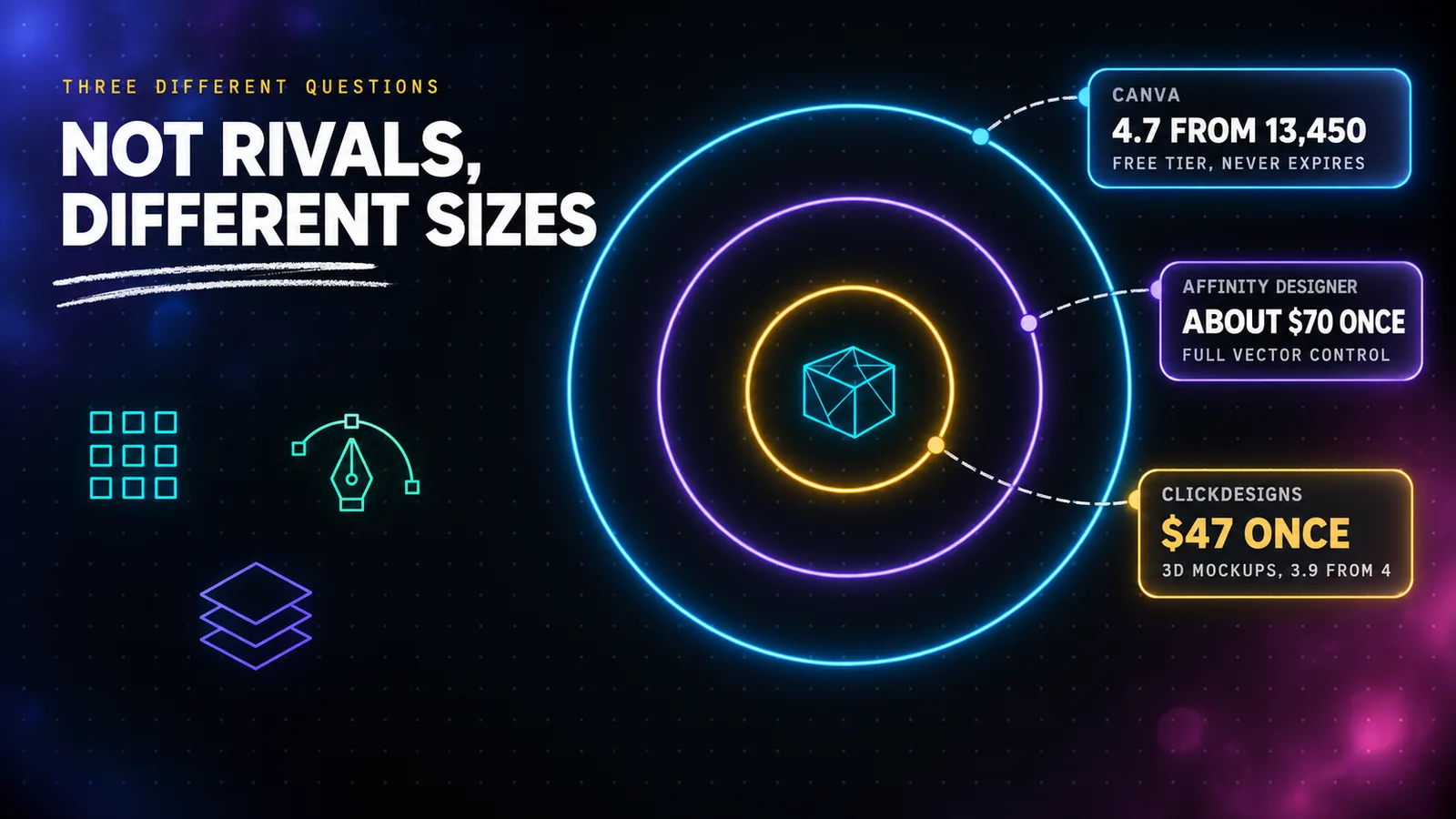
The comparison people actually search for is against Canva, so start there.
Canva is the default and deserves to be. It has a free tier that never expires, a vastly larger template library, real collaboration, and 13,450 Capterra reviews against ClickDesigns' two. For general marketing graphics, social posts, presentations and documents, it is simply the better tool and it costs nothing to start.
Where Canva is weak is exactly where ClickDesigns is strong. Canva's 3D product mockups are limited and mostly come from third party apps and static frames. If your work is box shots, book covers, device mockups and bundle shots, ClickDesigns does that specific job better and faster.
Affinity Designer is the answer for anyone who found the template ceiling frustrating. It is a professional vector editor, a one-time purchase in the region of $70, with no subscription and no metering. It will do anything you can design, and it will demand you know how to design it. That is the trade.
Set against each other honestly:
- Pick Canva if you want the broadest tool, a real free tier, and no decision to regret. This is the right answer for most people.
- Pick ClickDesigns if 3D mockups and product shots are the actual job, and $47 once is worth more to you than a monthly bill.
- Pick Affinity if you can design and you resent subscriptions.
- Pick the ClickDesigns subscription over its lifetime deal if you specifically want the AI tools, because that is the version of the product they are attached to.
The one comparison the existing reviews get wrong is treating this as a Canva replacement. It is not, it is not priced as one, and the vendor does not really claim it is.
Is the ClickDesigns lifetime deal good value?
On price alone, yes. The ClickDesigns lifetime deal costs $47 once against the same vendor's cheapest annual plan at $180 a year, so it pays for itself in under four months and every month after that is free. The catch is which version of the software that $47 actually buys.
Everything above is critical of the page. This section is the case in its favour, because there is one and it is arithmetic.
The vendor's cheapest subscription is $15 a month billed annually, or $180 a year. Its middle plan is $288 a year and its top plan is $504.
The lifetime licence costs $47 once.
If the licence is genuinely perpetual, and the ClickBank listing shows no rebill of any kind, then it pays for itself against the cheapest annual plan in under four months. Against the monthly Standard plan at $20, it pays for itself in ten weeks.
That is a real argument, and no amount of stale sales copy changes it.
The condition attached to it is the one this review keeps returning to: you are buying the 2022 product. The feature list on the offer page is the feature list from before the AI tools, before the metering, and before the tier structure that now gates 3D mockups behind the Pro plan.
So the honest framing of the value is this. If what you want is a template driven mockup and cover generator with commercial rights, and you would have been happy with the software as it stood in 2022, $47 once is good value and you should take it.
If what drew you in was the AI feature set, the $47 is the wrong purchase, because the page selling it to you does not mention AI at all and the support desk says those tools arrive on upgrade.
The way to tell which you are is the free trial. Spend fifteen minutes in the current product, work out which half of it you care about, then buy the half you want.
Free ClickDesigns alternatives worth trying first
Before spending anything, three of these cost nothing and one of them may end the question entirely.
- Canva's free tier. Permanent, generous, and covers the majority of what most people need from a design tool. If your work is social graphics and simple marketing assets, start and probably stop here.
- The ClickDesigns free trial itself. On the vendor's own site, no credit card. The most direct test of whether this specific editor suits you.
- Photopea. A free browser based editor that opens and edits PSD files, for anyone who needs real layer control without paying for Photoshop.
- GIMP and Inkscape. Free, open source, raster and vector respectively. Steeper to learn, unlimited in what they permit, and neither will ever send you an invoice.
- Figma's free tier. Excellent for interface and layout work, with real collaboration, though it is not built for product mockups.
For the specific job ClickDesigns is best at, 3D product mockups, the free options are genuinely weaker, and that is the honest reason the product has buyers. Mockup rendering is the thing you cannot easily get for nothing.
If your interest is animated and whiteboard video rather than static graphics, the closest tool I have examined in this category is InstaDoodle, which is a different job with a similar sales structure.
Who ClickDesigns is for, and who should skip it
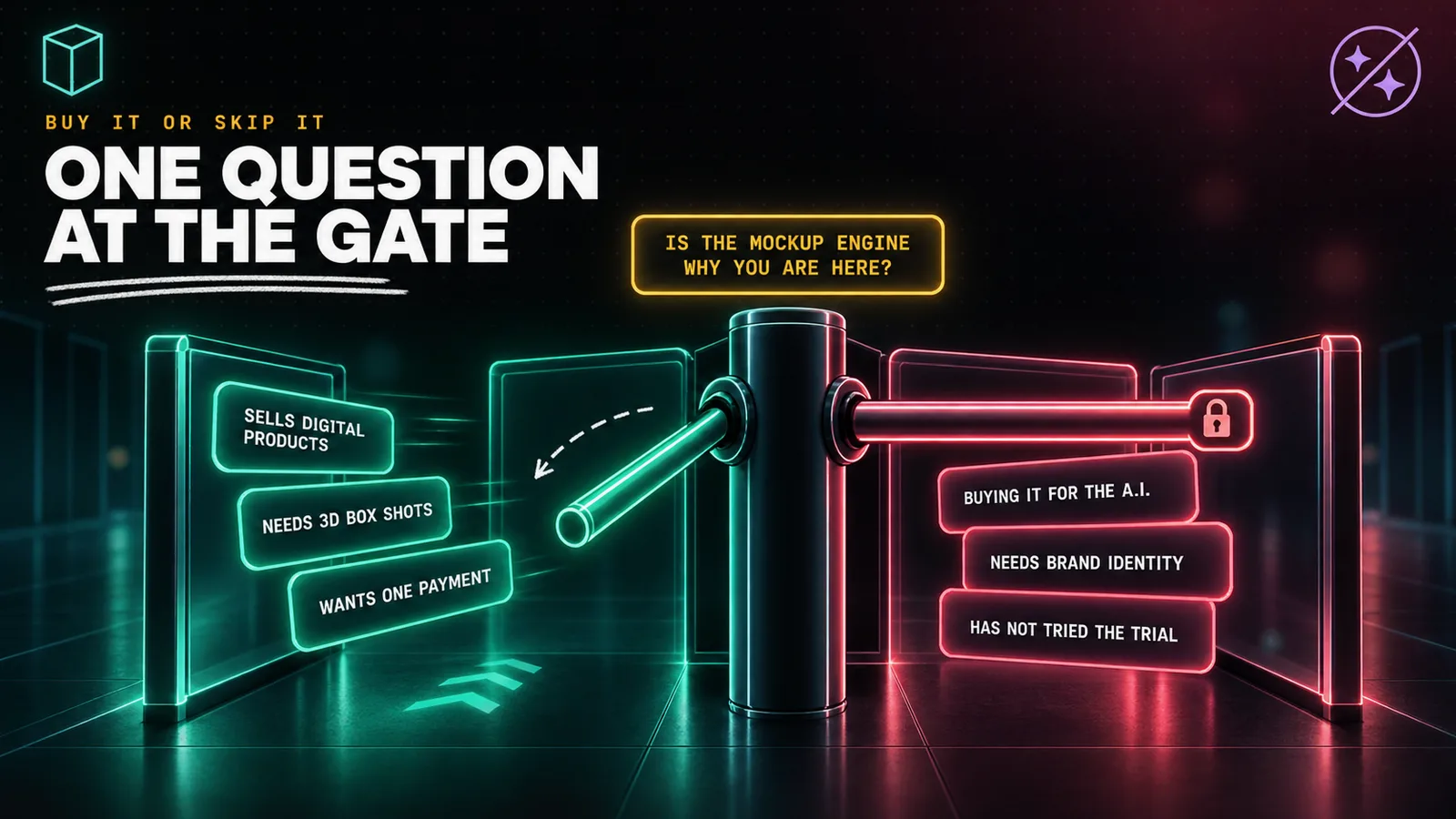
ClickDesigns suits digital product sellers, affiliate marketers, bloggers and ecommerce sellers who need box shots, covers and bundle images regularly and want one payment. It is the wrong purchase for anyone buying it for the AI tools, anyone who needs brand identity work, and anyone who has not yet tried the free trial.
Buy it if:
- You sell digital products and need box shots, covers, bundle images and report graphics regularly.
- 3D mockups are the actual job. This is the feature that justifies the price.
- You want one payment. A perpetual licence at $47 against $180 a year compounds in your favour quickly.
- You are not a designer and do not want to become one. Templates are the point, not a limitation.
- You have already tried the free trial and know the editor suits you.
Skip it if:
- You are buying it for the AI tools. Buy the subscription instead, which is where they live and where they are documented.
- You need brand identity work. The logo output is the weakest part of the product by common consent.
- You want a general design tool. Canva's free tier is better and costs nothing.
- You need animated or video export and would be on the entry tier, which produces neither.
- You have not tried it yet. There is a free trial. Use it before you spend $47 on a page written in 2022.
- You are tempted by the instalment plan. At $107 for a $47 product, that option is for nobody.
Getting better results out of ClickDesigns
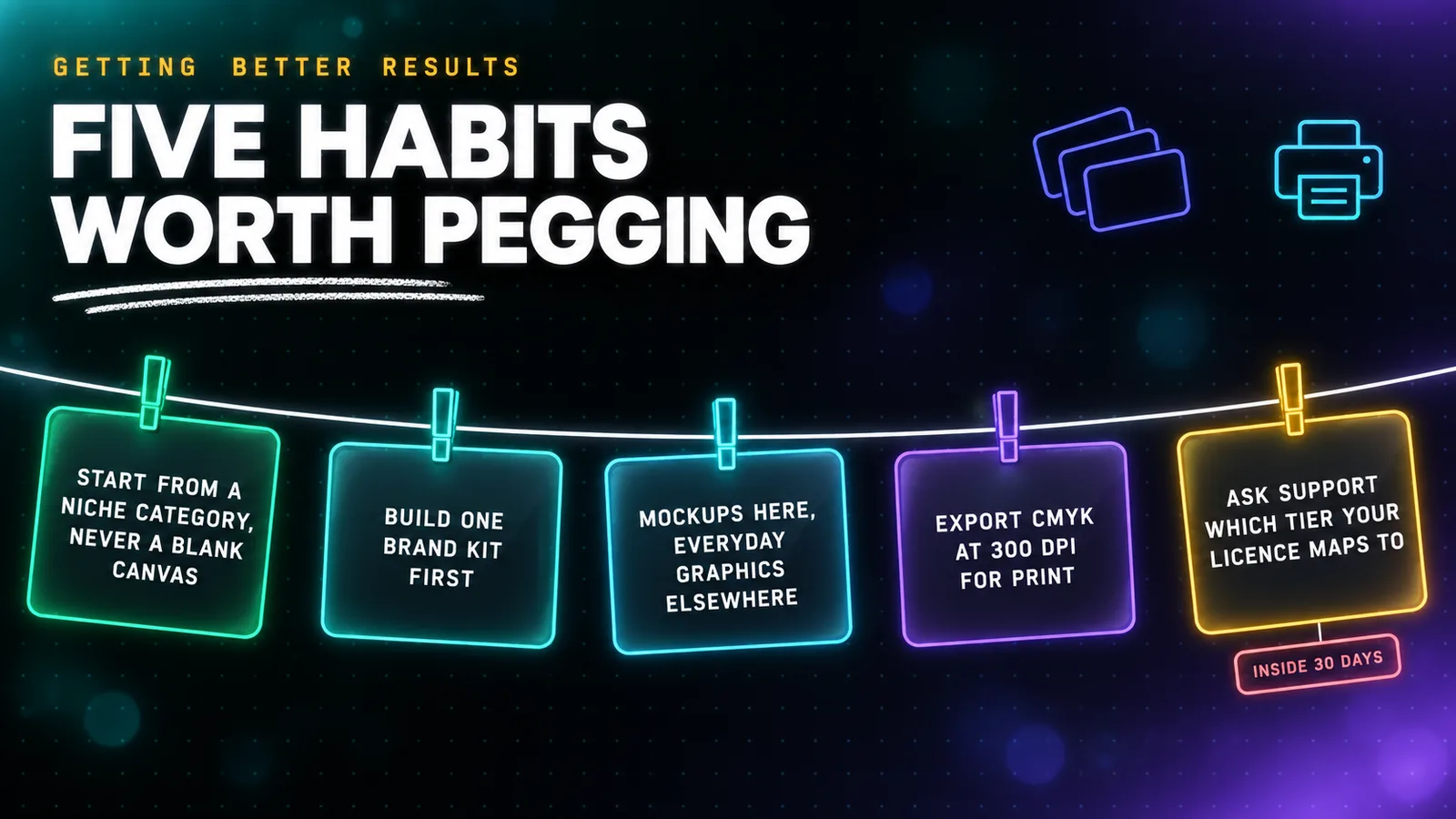
If you do buy it, these are the things worth knowing early.
Start from a niche category, never a blank canvas. The templates carry the composition, and the product is markedly weaker the moment you ask it to be a general editor. Choosing the use case first is how it is designed to be used.
Build a brand kit before you build anything else. Fix your fonts and colours once and every subsequent design inherits them. It is the difference between a set of assets that look related and a set that do not.
Use it for what it is best at and something else for the rest. The most effective setup is ClickDesigns for mockups, box shots and covers, and Canva's free tier for social posts and everyday marketing graphics. Neither tool is trying to be the other.
Make your own watermark rather than paying for the Agency tier. The support desk publishes a step by step article on building one from a blank canvas with a shape, your logo and reduced opacity. It exists precisely because watermarking is gated behind a $197 upgrade, and it works.
Export CMYK at 300 DPI for anything going to print. The option is there on every tier and it is the one setting people miss until a printer rejects the file.
Ask support to confirm your tier in writing. This is the important one. Send a ticket asking which current plan your lifetime licence corresponds to, whether the AI usage allowance applies, and whether 3D mockups are included. Do it in your first week, while a refund is still available.
ClickDesigns refund policy, and how to buy without regret
There are three versions of this policy in public circulation and they do not agree.
Version one, the sales page. It promises a "30-Day, money back guarantee" with a "no questions asked, full refund", and repeats it four times.
Version two, the support desk. It calls the guarantee "iron-clad" and says 30 days, then adds a line the sales page does not: "All transaction or refund fees are your responsibility." That is not a full refund.
Version three, the Terms of Service. Under a heading that reads, in the vendor's own words, "Return and Refund Policy", the entire policy is this: "If, for any reason, You are not completely satisfied with any good or service that we provide, don't hesitate to contact us and we will discuss any of the issues you are going through with our product."
No window. No entitlement. An offer to talk.
So the guarantee that actually protects you is none of the vendor's three versions. It is ClickBank's, printed on the checkout itself: "ClickBank will allow for the return or replacement of any product within 30 days from the date of purchase."
That is the one with a company obliged to honour it, and it is why buying this through the ClickBank route is materially safer than buying direct.
Thirty days is also the floor rather than the norm. ClickBank permits sellers to set anywhere up to sixty days, and most products reviewed here sit at sixty. This one is set at thirty, which halves your testing window.
So buy it in this order:
- Use the free trial on the vendor's public site first. Cost: nothing. This is the step the sales page hides.
- If the editor suits you, buy the $47 front end through the ClickDesigns offer page.
- Decline every upgrade at the checkout. All of them can be bought later, and none is explained well enough to decide on the spot.
- Never take the instalment option. $107 for a $47 product.
- Open a support ticket in week one asking which tier your licence maps to and whether AI usage is included.
- Keep the receipt email. Refunds go through ClickBank order support at clkbank.com using the order number, not through the vendor.
- Diarise day 25. Your window is thirty days, not sixty.
ClickDesigns review: the final verdict
ClickDesigns is a real design tool with a genuinely strong mockup engine, sold through a page that has not been honest about what it is for nearly four years.
The software earns its keep in one specific way. If you need 3D box shots, covers, device mockups and bundle images, it produces them faster than the alternatives and you own what you make. At $47 once against $180 a year for the vendor's own cheapest plan, the arithmetic works inside four months.
The page selling it does not earn anything like the same confidence. "Today ONLY $67" has meant the same day since 20 November 2022, and the $697 a year it discounts from is a number the vendor charges nobody.
The banner on its own pricing page still says Cyber Week 2024. The advertised price and the charged price differ by $20.
Five upgrades totalling $812 go unmentioned until the payment screen, and the terms that legally govern your purchase promise no refund at all.
None of that makes it a scam. It makes it a product whose marketing stopped being maintained while the product itself moved on, and a buyer who reads only the offer page will not know which version they are getting.
So the verdict is conditional, and the condition is simple. Try the free trial on the vendor's own site before you spend anything. If the mockup engine does what you need, the $47 lifetime licence is good value and you should take it, decline every upsell, and confirm your tier with support inside the refund window.
If you came for the AI features, buy the subscription instead. That is where they are, that is where they are documented, and the page charging you $47 has never once mentioned them.
Every affiliate review in Creator Tools gets checked this way, against the vendor's own paperwork rather than its sales copy, because in this category the two are rarely the same document. The pattern this one adds to the pile is worth remembering on your next lifetime deal: when a vendor sells the same software two ways, read the page aimed at existing customers, not the page aimed at you.
FAQ
- How much does ClickDesigns actually cost?
- The ClickBank sales page advertises $67, but its own buy button loads a checkout charging $47 before any coupon is entered. Behind that sit five paid upgrades the sales page never names: a $297 Suite order bump, then Mockups at $77, Maximizer at $97, Design Pages at $97 and Agency at $197. Accepting everything costs $812. Separately, the vendor's public site sells the same software as a subscription at $20 to $49 a month.
- Is the ClickDesigns lifetime deal real?
- The one-time payment is real and there is no rebill on the ClickBank listing. What is not real is the urgency around it. The offer page has read Today ONLY $67 against a Regular Price of $697 a Year since 20 November 2022, which is 1,405 days of the same today. The $697 figure matches nothing the vendor charges anywhere. Its public annual plans list at $360, $576 and $1,008.
- Can you use ClickDesigns for free?
- Yes, on the vendor's own site. Every plan on clickdesigns.com carries a Try it for free button and the words No credit card required. The ClickBank funnel that sells the $47 lifetime licence does not mention the free trial once. If you want to know whether the editor suits you before paying anything, start on the public site rather than the affiliate offer page.
- Does the $47 ClickDesigns deal include the AI tools?
- The sales page for the $47 tier does not mention artificial intelligence anywhere, not once across the whole page, while the vendor's public pricing page mentions AI 86 times and meters it at 100, 500 or 1,000 uses a month by tier. The support desk states that AI tools are added to your account upon upgrading. Treat the AI feature set as something to confirm with support before buying, not as included.
- Is ClickDesigns legit or a scam?
- It is a real product from a real company. Companies House lists 123 Click Limited, number 14662523, incorporated on 14 February 2023 in London, with Mohammad Latif as its sole officer. The software works, the designs you create are yours, and the refund runs through ClickBank. The criticism here is about a sales page that has not been updated in nearly four years, not about fraud.
- What is the ClickDesigns refund policy?
- ClickBank's checkout states 30 days from the date of purchase, and that is the version that is actually enforceable. The vendor's own Terms of Service, under a heading reading Return and Refund Policy, sets out no window and no refund right at all, only an offer to discuss the issue. The support desk says 30 days but adds that transaction and refund fees are your responsibility.
- Is ClickDesigns better than Canva?
- Not as a general design tool. Canva has a free tier that never expires and 13,450 Capterra reviews against ClickDesigns' two. Where ClickDesigns genuinely competes is 3D product mockups, box shots and bundle shots, which Canva handles poorly and which is the feature its buyers consistently praise. Pick it for mockups, not as a Canva replacement.
- How much does ClickDesigns cost for buyers in India?
- The ClickBank order form, loaded with an Indian context on 25 September 2026, showed Rs 5,030.88 plus Rs 905.56 GST for a total of Rs 5,936.44. That GST line is exactly 18.00%. The implied exchange rate is 107.04 rupees to the dollar against a market rate of 96.02 the same day, so the delivered cost is about $61.83 on a $47 sticker, roughly 31% over.