note
Affiliate disclosure: this review contains affiliate links to InstaDoodle. If you buy through one, I earn a commission at no extra cost to you. Nobody paid for this review, I was not given a free copy, and every con I found stays in. How I handle affiliate links is covered in the disclaimer.
Every few months a piece of software floats across my feed promising to replace a $500 service for the price of a pizza.
InstaDoodle is the latest one. A $37, cloud-based doodle video maker that claims anyone can produce hand-drawn whiteboard animation in three steps, with no drawing skills and no editing background.
I care about this genre for a practical reason. I spend my days explaining systems, payments flows, event pipelines, why a queue backs up, and the whiteboard explainer format is still one of the best ways to make a complex idea land.
Paying an agency $500 to $2,000 per finished minute for that is absurd for a blog or a small channel. So a one-time $37 tool is worth taking seriously, if the claims survive contact with reality.
That is what this InstaDoodle review is: the sales page, checked line by line, with the parts they do not advertise left in.
Is InstaDoodle worth it? The short answer
If you want the verdict without the twelve sections behind it, here it is.
InstaDoodle is worth $37 if you need occasional, simple doodle videos, you want to work in a browser instead of installing software, and you treat the AI generator as a bonus rather than the main event.
It is not worth it if you produce whiteboard videos every week, you need fine control over how each stroke is drawn, or you expect the $37 tier to look like the demo video. Those expectations end in a refund request.
The honest positioning is a budget entry point into whiteboard animation, sold with marketing that is louder than the product needs.
The product underneath is real, the 60-day guarantee is real, and so are the upsells waiting after checkout. The rest of this review walks through all three.
How I put this review together
I am not going to pretend I have spent a month producing client videos in InstaDoodle, because I have not, and reviews that fake that are the reason this niche feels untrustworthy.
What I did instead is the same thing I do before any tool gets near my own stack: verify every claim against something that is not the vendor's own marketing.
That meant going through the sales page claim by claim, reading the full run of buyer reviews on Trustpilot, watching real user walkthroughs rather than the official demo, and pricing the alternatives properly.
It is the same instinct I apply when I evaluate AI coding assistants for real work: the demo is a best case, so you hunt for the failure reports before you trust anything.
Where something below is a first-hand pattern from buyers, I say so. Where it is a sales page claim I could not independently confirm, I flag that too.
What exactly is InstaDoodle?
InstaDoodle is a cloud-based whiteboard animation tool built by the team behind Revoicer, an established AI voiceover product.
That origin matters more than it sounds. This is not an anonymous one-off launch; it is a team with an existing product, an existing support operation, and a reputation attached to the outcome.
The pitch is simple. You write a script, arrange sketch-style scenes, and the software renders a video of a hand drawing each element onto the screen, the classic whiteboard explainer look.
Three things define it against older tools in this space:
- It runs in the browser. Nothing to install, no render machine needed, works the same on a laptop or a desktop.
- It ships a library of over 1,000 sketch elements. Characters, props, poses, and scenes you drag onto the canvas.
- It has a text-to-doodle AI. Type a description and the DoodleAI engine draws a custom element in the same sketch style.
The output is aimed at explainer videos, course lessons, YouTube intros, sales videos, and social clips, anywhere the hand-drawn style buys attention.
At the time of writing the front-end price is $37, one time, sold through ClickBank with a 60-day money-back guarantee.
Why the whiteboard format still works
It is fair to ask whether doodle videos are a 2015 relic. In my experience explaining technical systems, they are not, and there is a simple mechanism behind that.
A hand drawing an image creates anticipation. The viewer's eye follows the pen, tries to guess the shape before it finishes, and stays engaged in a way a static slide never manages.
That is why the format refuses to die in course platforms, sales pages, and training material. It is not fashion; it is that watching something being drawn holds attention longer than watching something appear.
The style also flattens production quality differences. A doodle video made by an amateur and one made by a studio sit far closer together than the same comparison with live video, which is exactly why budget tooling makes sense here.
How InstaDoodle works: script to video in three steps
The workflow is genuinely simple, and this part of the marketing holds up. The whole editor is built around three moves.
Step one: the script. You write or paste your narration, broken into scenes. This becomes the backbone of the video, one scene per idea.
Step two: the visuals. For each scene you pick elements from the sketch library, or generate custom ones with a DoodleAI prompt, and arrange them on the canvas. A drawing hand, male or female styles included, animates each element in.
Step three: the export. Add a voiceover and background music, pick your format, and render. The base plan exports in 1080p Full HD.
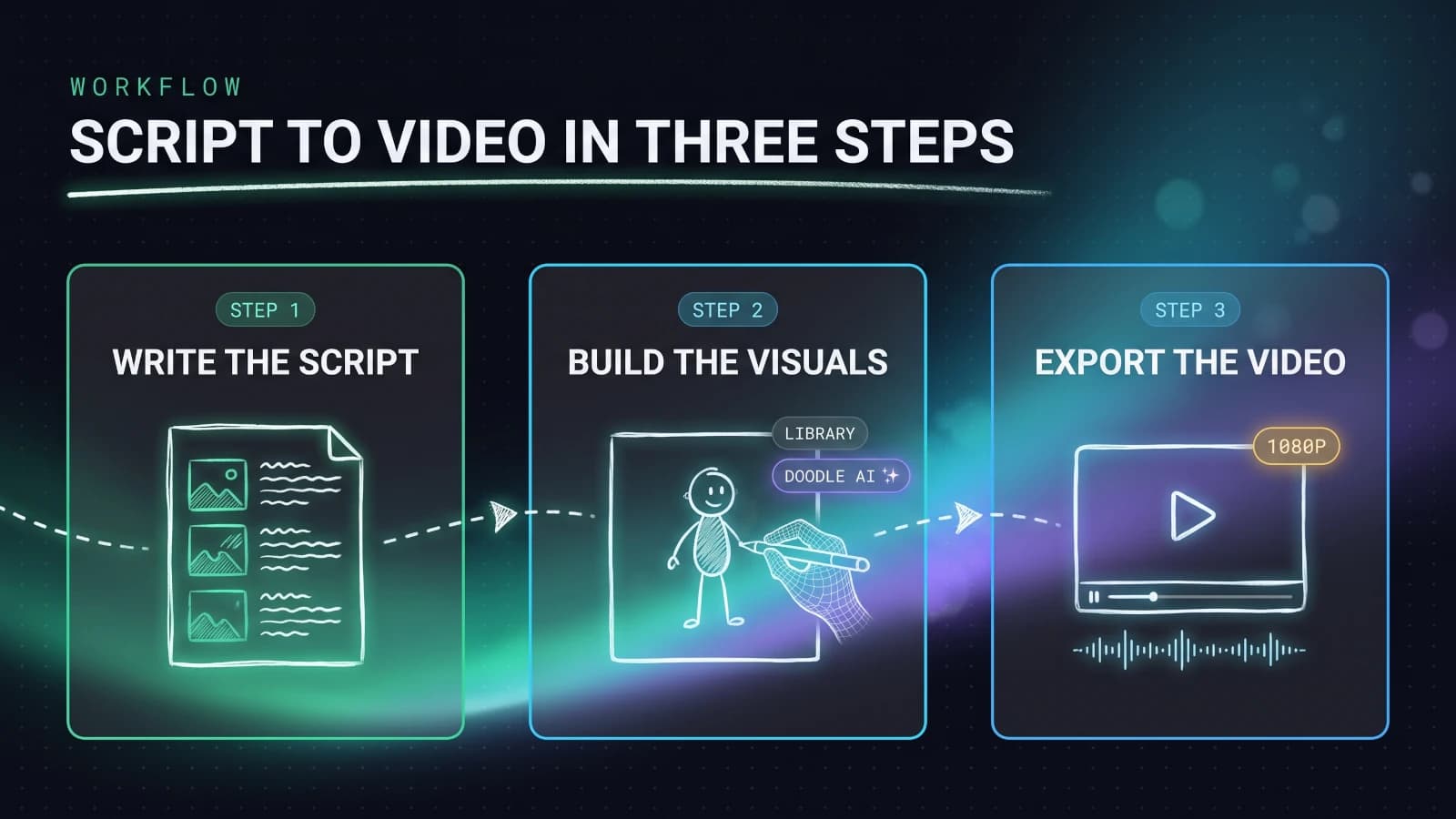
There is no timeline full of keyframes, no layer soup, no learning curve worth the name. Buyers consistently describe having a first working video within their first session, and the interface is the single most praised thing in the reviews.
If you have ever opened a proper video editor and quietly closed it again, this is the level of tool InstaDoodle is: closer to building a slide deck than editing a film.
One more genuinely useful piece: an image-to-sketch converter. Feed it a logo or a photo and it redraws the thing in the doodle style, which is how you get your own branding into a video without owning a drawing tablet.
InstaDoodle pricing: what $37 actually buys
Here is what the front-end purchase includes, and this list matters because the marketing blurs where the base plan ends.
- The full editor, cloud-based, with unlimited video creation on the base tier.
- The standard sketch library of 1,000+ characters, props, and scenes.
- Multiple drawing hand styles to animate elements in.
- The image-to-sketch converter for logos and photos.
- 1080p export, which is enough for YouTube and course platforms.
- 150 DoodleAI credits for AI-generated custom elements.
- The 60-day money-back guarantee, handled through ClickBank.
For $37, one time, that is a genuinely strong bundle. The two comparable brand names in this space, Doodly and VideoScribe, both cost more, and VideoScribe charges in the region of that price every month.
But there are two asterisks on the value story, and they deserve their own sections, because they are exactly what the sales page glosses over.
The first asterisk is those 150 AI credits. The second is what happens on the checkout pages after you click buy.
DoodleAI credits: the fine print nobody reads
DoodleAI is the headline feature: type "a cow dressed as a businessman juggling pineapples" and it draws that, in the same hand-sketched style as the built-in library.
When it works, it solves the oldest problem in whiteboard tools, which is that every stock library eventually runs out of exactly the element your script needs.
Here is the fine print. Every AI generation spends credits, you get 150, and they do not renew.
Regular users report burning through the included credits in two to four weeks of active use. After that, more credits are a paid add-on, which reviewers estimate at roughly $17 to $27 a month for heavy AI users.
That changes the mental model of the purchase. The editor is genuinely one-time. The AI feature is effectively a consumable with a starter pack.
I do not think that structure is a scam, image generation has real compute costs, and every AI tool prices it somehow. What earns the criticism is that the marketing leads with the AI while whispering about the meter attached to it.
So price it honestly in your head before you buy:
- If you will build videos mostly from the 1,000+ element library, the credits are a nice bonus and $37 is the real price.
- If the AI generator is the reason you are buying, budget for credit top-ups, because 150 generations will not last you long.
That single distinction settles most of the "is InstaDoodle worth it" question, so it is worth being honest with yourself about which buyer you are.
The upsell ladder, mapped before you hit checkout
Buy any ClickBank product and you will meet the upsell sequence. InstaDoodle's is aggressive, and knowing the map in advance is worth actual money.
After the $37 front end, the checkout flow offers, at the time of writing:
- A Pro upgrade at around $67, which unlocks the advanced effects and features the demo video leans on.
- An expanded element pack, adding 3,000+ extra characters, poses, and props.
- 2K and 4K export, since the base plan tops out at 1080p.
- Extra drawing hands, eight additional styles.
Stack everything and the $37 purchase can pass $200. That is the number the sales page never says out loud.
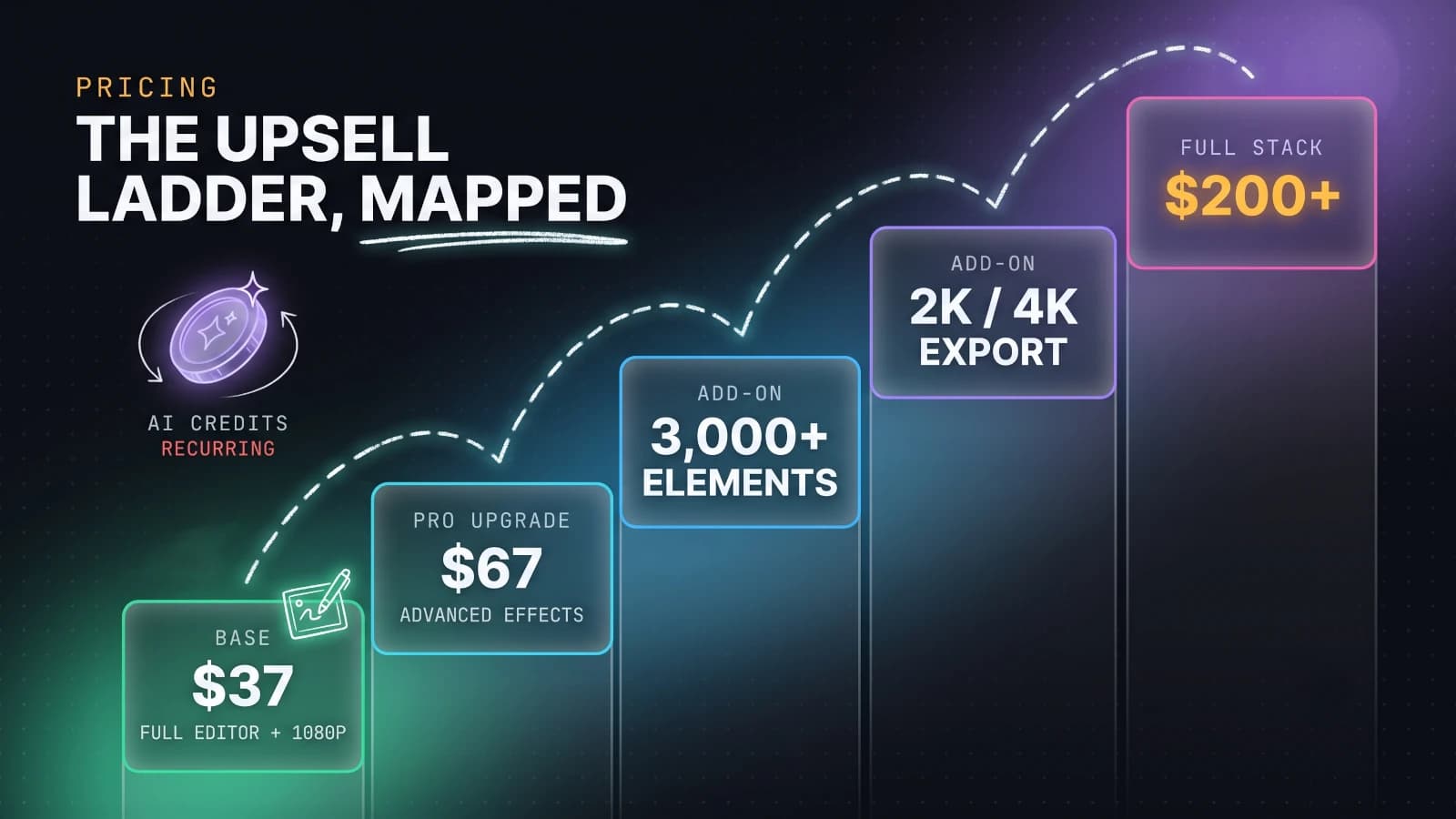
Two honest observations about this ladder.
First, the base product works without any of it. You can decline every offer and still make complete 1080p videos from the standard library. Nothing about the core workflow is held hostage.
Second, the one upgrade with a real argument behind it is the Pro tier, because several of the animation effects shown in InstaDoodle's own ads live there, not in the base plan. Buyers on Trustpilot flag exactly this gap between the demo and the $37 tier, and it is the most legitimate complaint in the pile.
My advice is boring and firm: buy the front end alone, use it for a week, and only then upgrade if you personally hit a wall the Pro tier removes. Upsell pages are designed to be bought tired; do not decide there.
What real buyers say about InstaDoodle
Read the entire review pile, positive and negative, and a consistent picture forms. That consistency itself is a good sign; scam products produce chaotic reviews, real products produce patterned ones.
What buyers consistently praise:
- The ease of use. Non-technical buyers, coaches, teachers, and small business owners describe getting a usable video out on day one.
- The speed to a finished result, with export times short enough to iterate.
- The value at $37 against subscription-priced alternatives.
- Support and refunds working, in most accounts, the way the guarantee promises.
What buyers consistently complain about:
- Rendering slows down as projects grow. Long, slide-heavy videos are where the cloud editor starts to strain.
- A cap on video segment length, which one detailed reviewer hit while producing 20-minute-plus content. The workaround, exporting in parts and stitching them, works but is clumsy.
- The demo-versus-base-plan gap covered above: effects shown in ads that turn out to be Pro features.
- The feeling that a "lifetime" purchase keeps asking for money, through credits and add-ons.
Notice what is absent from the complaints: nobody credible calls the product fake, broken, or unusable. The anger, where it exists, is about expectations set by the marketing, not about the software failing to function.
That is a meaningful distinction. It means the fix is on the buyer's side of the screen: recalibrate expectations, and the product underneath is decent.
Where InstaDoodle falls short
Marketing gaps aside, the tool has genuine limitations you should price in before buying. These are the ones that survive fact-checking.
It is a template tool, not an animation suite. You cannot control draw paths, stroke order, or fine timing the way Doodly allows. If you have a director's eye and want each frame obeyed, this will frustrate you.
Long-form content is not its lane. Between the segment cap and render slowdowns on big projects, InstaDoodle is happiest making videos measured in single-digit minutes. Course creators producing 30-minute lessons should look elsewhere or plan to stitch.
The base export is 1080p. Perfectly fine for YouTube, courses, and social. But if your workflow genuinely needs 4K masters, that is an upsell, and you should count it in the real price.
The AI is uneven. DoodleAI can produce exactly the element you asked for, and it can also produce something you discard, which still spends the credit. Treat it like every image generator in 2026: a strong assistant, a poor employee.
Cloud-only cuts both ways. No install and access from any machine is great, but there is no offline mode, and you are trusting the vendor's servers to stay up for as long as you want your "lifetime" access to mean something.
None of these are dealbreakers for the casual user the product is actually for. All of them are dealbreakers for someone trying to run a video production business on a $37 tool, which is precisely the buyer the ads flirt with.
InstaDoodle vs Doodly vs VideoScribe
The buying decision usually comes down to these three names, so here is the comparison stripped to what actually differs.
InstaDoodle is the budget, browser-based pick. One-time $37, AI element generation, fastest path from script to finished video, least control over the fine details.
Doodly is the control pick. Desktop software, drag and drop but with real depth: custom draw paths, layer ordering, multiple board styles including blackboard and glassboard, and huge asset libraries. Priced in tiers, and it costs meaningfully more than InstaDoodle over time.
VideoScribe is the polished subscription. Around forty dollars a month, a mature product with a large image library and a very gentle learning curve, popular with education teams and corporate training. The catch is that the meter never stops running.
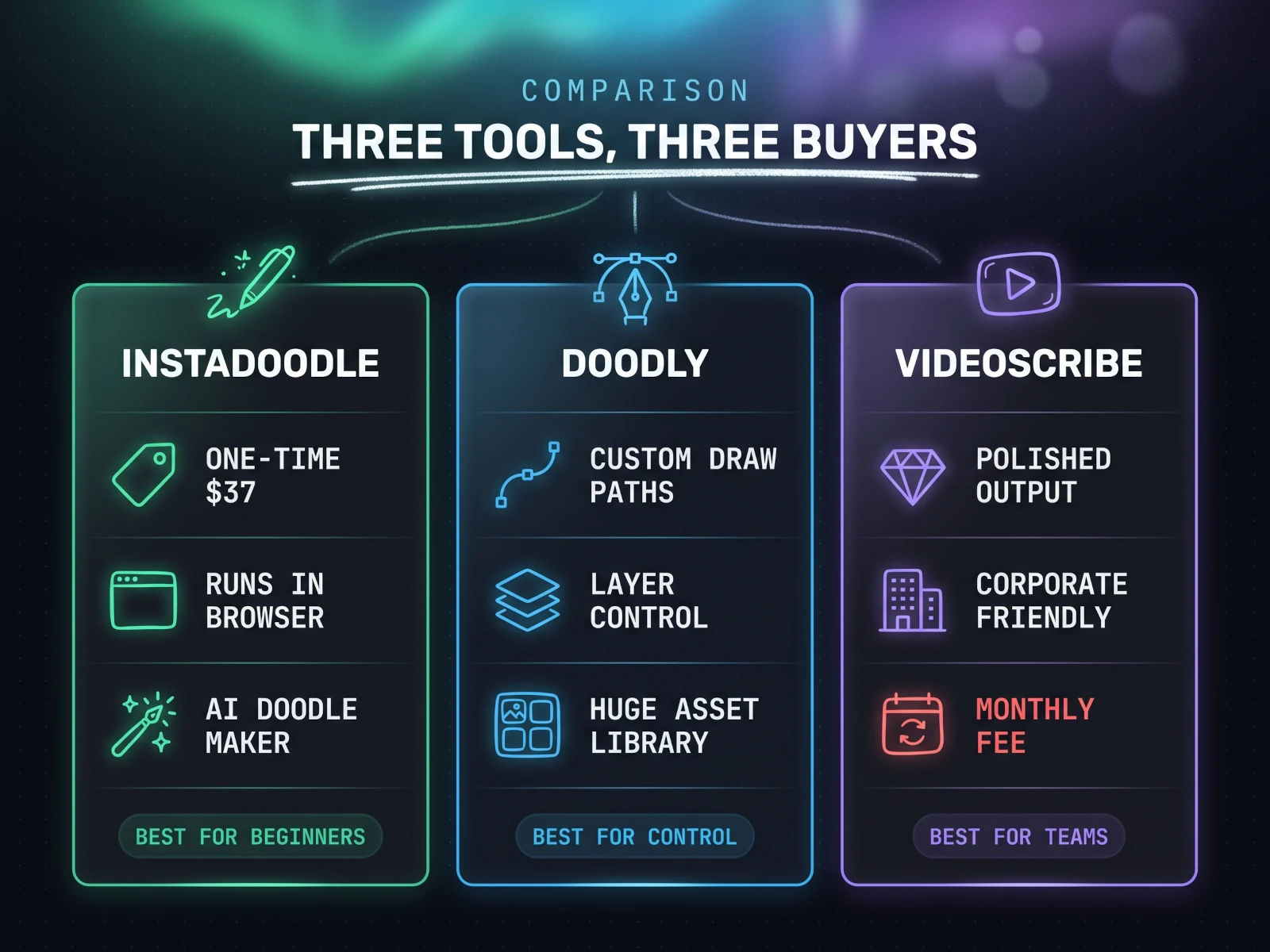
The way I would decide, translated into three questions:
How often will you actually make these videos? Occasionally: InstaDoodle. Weekly, as part of your work: Doodly, or VideoScribe if a subscription fits your accounting better than a desktop app.
Do you need to control how each element is drawn? If yes, that is Doodly's entire reason to exist, and InstaDoodle will feel like mittens.
Is the total budget under $50? Then the decision is made for you, and the good news is the cheap option is not the broken option.
One more honest note: "lifetime deal" pricing always carries platform risk. A subscription vendor has predictable revenue to fund servers; a one-time vendor funds them from new sales and upsells. That is part of why the upsell ladder exists, and part of the bet you are making either way.
What a doodle video costs without InstaDoodle
Context makes the $37 make sense, because the alternative to buying a tool is buying the video.
At the top of the market, professional whiteboard explainer production runs $500 to $2,000 per finished minute at agencies. That is the number that makes founders wince and is the entire reason this software category exists.
On Fiverr, freelancers deliver whiteboard videos from roughly $15 for a basic short clip to $135 and up for premium work with scripting and voiceover, per video, every time you need one.
Against that backdrop, a $37 one-time tool pays for itself on the second video, even against the cheapest freelancer, as long as your quality bar is "clear and professional enough" rather than "broadcast."
That is the fair frame for the value question. InstaDoodle does not compete with a $2,000-per-minute studio, and it is silly to pretend it does. It competes with the $50 to $150 you would otherwise spend outsourcing each explainer, and at that job it wins quickly.
Run the numbers on a realistic case. A course creator who needs ten short explainers this year is looking at roughly $500 to $1,200 on Fiverr for decent quality, plus a week of back-and-forth revisions per video.
The same ten videos through InstaDoodle cost $37, maybe $104 with the Pro upgrade, plus the creator's own evenings. Even valuing your time honestly, the tool wins by hundreds of dollars, provided you were going to make those videos anyway.
That last clause is the trap in every software deal. A $37 tool you never open is worth exactly $37 less than nothing, so buy it the week you need it, not for the someday project.
The hidden cost on your side is time. Your first video will take an evening, not the "three clicks" of the pitch. By the third one, buyers report the process getting genuinely fast.
Who InstaDoodle is for, and who should skip it
Pulling everything together, here is the honest sorting.
Buy it if you are:
- A course creator or teacher who needs short doodle explainers for lessons and does not want to learn real animation.
- A small business owner or marketer making the occasional promo, sales explainer, or social clip.
- A YouTuber or blogger who wants the whiteboard style for intros and concept explanations.
- Anyone who wants to test the whiteboard format cheaply before committing to a heavier tool.
Skip it if you are:
- A freelancer or agency producing whiteboard videos weekly. The control ceiling and render behaviour will cost you more than Doodly's price difference.
- Making long-form content past the ten-minute mark as your default. The segment cap makes this the wrong tool.
- Expecting the demo video's polish at the $37 tier. Some of that polish is Pro-tier, and buying angry is how refunds happen.
- Someone who already owns Doodly or VideoScribe and is happy. There is no leap here worth a migration.
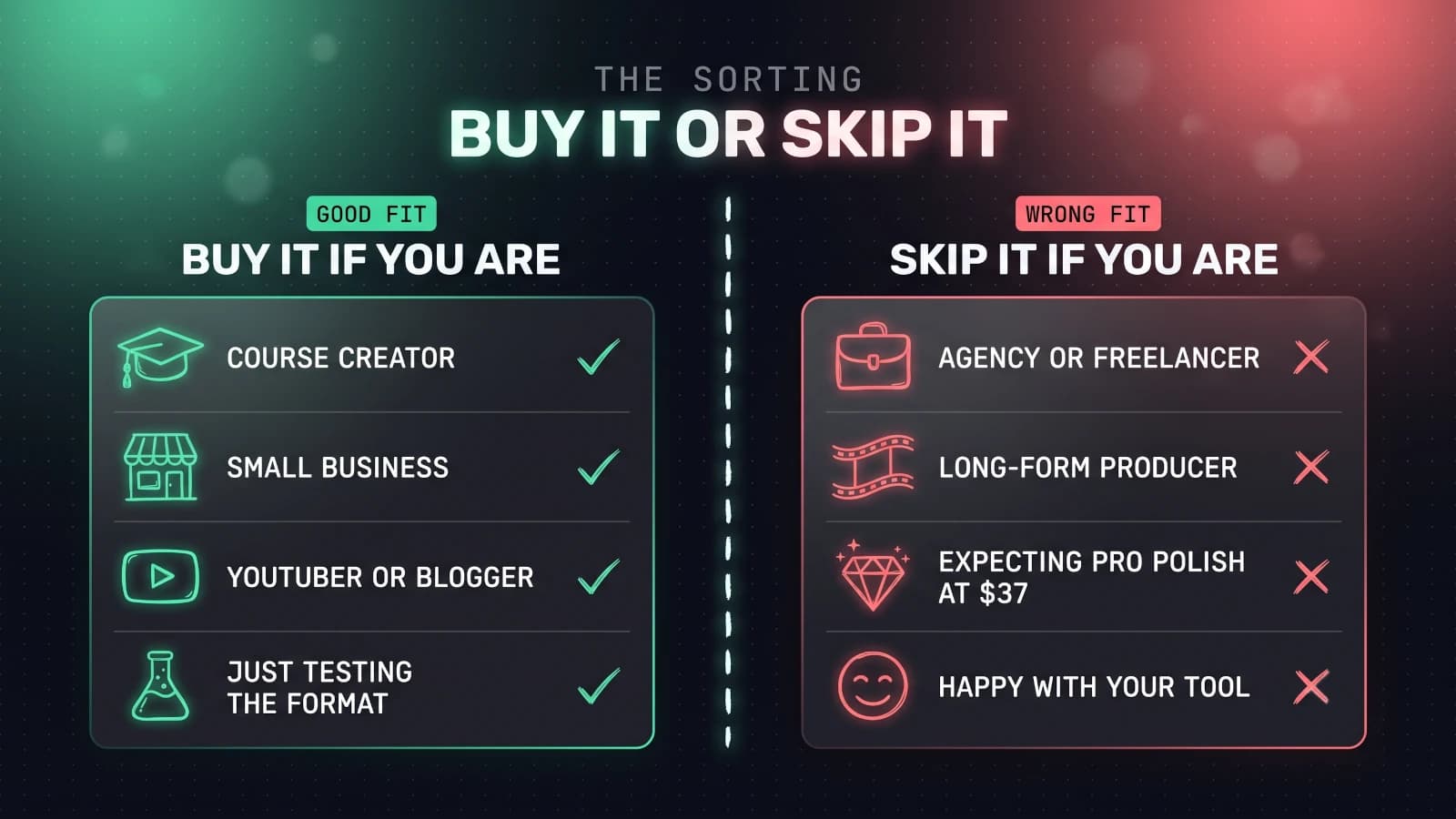
If you recognised yourself in the first list, the purchase is easy to justify at this price. If you recognised yourself in the second, no discount changes the answer.
Getting good results out of a budget tool
A tool like this rewards technique more than the price tag suggests. The gap between an amateurish doodle video and a sharp one is rarely the software; it is five habits, all free.
Write the script first, and write it short. The best explainers run 60 to 150 words per minute of video. Draft the narration before you touch the editor, and cut it by a third; every whiteboard video improves when it says less.
One idea per scene. The format's power is sequential reveal, so resist crowding a canvas. If a scene needs three sentences of narration, it probably wants to be two scenes.
Let the voiceover set the pace. Record or generate the narration first, then time each scene's drawing to it, not the other way around. Videos assembled visuals-first always feel rushed in some places and dead in others.
Use the AI for the odd elements, the library for the rest. DoodleAI credits are scarce, so spend them on the elements no stock library has, your product, your specific metaphor, and lean on the 1,000-strong library for generic people and props.
Keep the music at a whisper. The most common tell of an amateur explainer is a backing track fighting the narration. Duck it low enough that you notice it only when it stops.
tip
If you need a voiceover and hate your own recording setup, the same team's Revoicer product exists precisely for this, and the two tools are built to work together. A free alternative is recording narration in a quiet room with your phone, which beats a robotic default voice every time.
None of this is InstaDoodle-specific, which is rather the point. Master these on a $37 tool and they transfer intact if you ever graduate to Doodly or a human animator.
The 60-day guarantee, and how to buy without regret
The reason I can recommend trying InstaDoodle at all, despite the marketing noise, is the refund structure.
The product sells through ClickBank, one of the oldest digital retailers, and carries a 60-day, no-questions money-back guarantee. Refunds go through ClickBank's standard order support, which means the process does not depend on the vendor being in a good mood.
Sixty days is long enough to build several real videos and know the truth. That converts this from a leap of faith into a cheap experiment.
If you decide it fits, here is the sensible way to buy, based on everything above:
- Get the $37 front end only from InstaDoodle's official site. Decline every upsell on the first pass; the base product is complete without them.
- Build two real videos in your first week. Not tutorials, actual videos you need. This is what the guarantee window is for.
- Watch your credit balance as you use DoodleAI, so the consumable economics are never a surprise.
- Only then decide on the Pro upgrade, and only if you personally hit a wall it removes.
- Not convinced by week six? Use the guarantee. That is what it is priced into the product for.
That sequence spends $37 to get a definitive answer, which is cheaper than the time most people burn deliberating over tools in this category.
The verdict
InstaDoodle is a decent budget tool wrapped in marketing that oversells it. Both halves of that sentence matter.
The product is real: a genuinely easy, browser-based doodle video maker from an established team, with a workable library, a useful image-to-sketch trick, and the fastest path to a finished whiteboard video I found at this price.
The catches are equally real: AI credits that run out, a $200+ upsell ladder behind a $37 storefront, 1080p unless you pay more, and a demo that borrows shine from the Pro tier.
Where does that leave the buying decision? Exactly where the "who it is for" list put it.
For occasional, short, practical explainer videos, at a one-time price with a 60-day escape hatch, InstaDoodle is a reasonable purchase and a genuinely low-risk one.
For professional volume or fine-grained control, put the same money and a bit more toward Doodly, and you will be happier for years.
Either way, decide from the list above, not from the countdown timer on the sales page. Timers regenerate. Refund windows are the real deadline.
This is the first review in my Creator Tools section, where I check creator software claims against evidence before you spend. If you want the same treatment applied to AI video models, my notes on which AI video generator is good for what run the same playbook.
FAQ
- Is InstaDoodle a one-time payment or a subscription?
- The base product is a one-time payment, $37 at the time of writing, and that covers the core editor, the standard sketch library, and 1080p export. The catch is that the DoodleAI image generator runs on credits. 150 come included, and once they are gone, topping up costs extra. So the software itself is one-time, but the AI feature behaves more like a consumable.
- Is InstaDoodle legit or a scam?
- It is a real, working product from the team behind the Revoicer AI voiceover tool, sold through ClickBank with a 60-day money-back guarantee, so it is not a scam. Buyer feedback is mixed but leans positive. The fair criticism is marketing that oversells: some advertised effects sit behind paid upgrades, and the included AI credits are easy to burn through. Go in expecting a budget tool and it delivers like one.
- Do I need drawing skills to use InstaDoodle?
- No. Everything is drag and drop. You pick from a library of over 1,000 pre-made sketch elements, or type a text prompt and the DoodleAI engine draws a custom element for you. The software then animates a hand drawing each element onto the canvas automatically. If you can build a slide deck, you can build a doodle video.
- What are InstaDoodle AI credits, and do they run out?
- Credits power DoodleAI, the text-to-doodle generator. Each generation spends credits, the base plan includes 150, and they do not renew. Regular users report running through them in a few weeks, after which extra credits are a paid add-on. If you lean on the built-in sketch library instead of the AI, the included credits last much longer.
- Which is better, InstaDoodle or Doodly?
- They win different jobs. InstaDoodle is cheaper, runs in the browser, and gets you to a finished video faster, so it wins for beginners and occasional use. Doodly is desktop software with deeper control, custom draw paths, layering, and larger asset libraries, so it wins for people producing whiteboard videos every week who want fine control. Budget and speed favour InstaDoodle, control and volume favour Doodly.
- Does InstaDoodle offer refunds?
- Yes. It sells through ClickBank with a 60-day money-back guarantee, and refunds go through ClickBank's standard order support process rather than depending on the vendor's goodwill. That guarantee is the main reason trying InstaDoodle is a low-risk decision despite the noisy marketing around it.