

If you have spent any time near AI video lately, you have probably asked the same question I did: which AI video generator should I actually use?
The honest answer is it depends on what you are making, and that is not a cop out.
A model that produces a jaw dropping nature shot can fall flat on a talking head, and the one with the best lip sync can look lifeless on a wide landscape.
So this is not another tier list. It is a field guide to which video generation model is good for what, written from actually using them rather than reading the spec sheets.
I have spent real time in Google Veo and Kling, and I lean on Veo for most work, especially its quality model.
Below I will be clear about where each tool wins, where it struggles, and which job I would hand to which model.
The short answer: which AI video generator to use for what
If you want the verdict before the reasoning, here is where I land after putting these tools on real projects.
- Most realistic, talking humans, native audio: Google Veo 3.1, in its quality mode.
- Nature, landscapes, and smooth natural motion on a budget: Kling.
- High action and fast movement: Kling, for its higher frame rate.
- Fine grained creative control and VFX work: Runway Gen-4.5.
- Physics heavy, experimental shots: Sora 2, with a caveat you need to read before you commit.
- The safest all round pick if you only learn one: Veo 3.1.
The rest of this guide is the reasoning behind each of those, plus the weak spots the marketing pages leave out.
How I judge a video model before I trust it
I do not trust a demo reel, because every model looks incredible when the vendor picks the prompt.
What I trust is the same thing I trust in any tool: how it behaves on my own work, under prompts I actually need, with the failures left in.
So for each model I run the same small set of shots. A person talking to camera, a wide nature scene, a fast motion clip, and a product on a plain background.
That mix stresses the four things that usually break: face and skin realism, natural motion, temporal consistency across the clip, and whether the audio and lip sync hold up.
I also watch the boring numbers, like generation time and cost per second, because a model you cannot afford to iterate on is not a model you will finish anything with.
It is the same instinct I bring to a big backend change: trust the tooling to handle the boring eighty percent, then verify the rest by hand before you ship anything.
That mindset, test it on real work, then confirm every claim, is exactly how I ended up preferring some of these models over their louder competitors.
The 2026 lineup, and why it narrowed
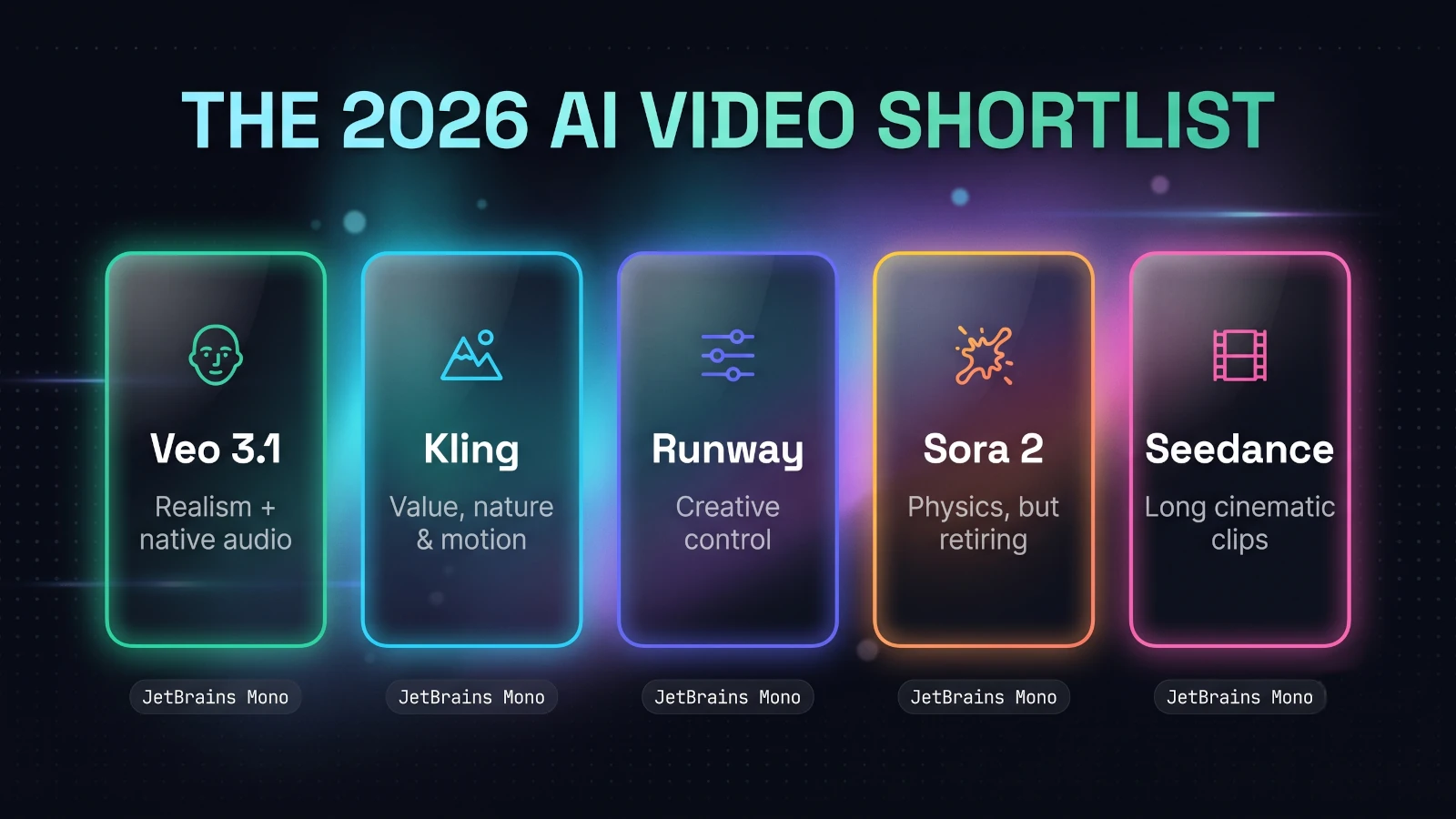
A year ago this list would have been a sprawl. In 2026 it has quietly narrowed to a handful of models that are genuinely worth your time.
At the top sit Veo 3.1 from Google, Kling from Kuaishou, and Sora 2 from OpenAI.
Just behind them, Runway Gen-4.5 holds the crown for hands-on creative control, and Seedance has become the interesting pick for longer, cinematic image-to-video shots.
Almost all of them now do both text-to-video and image-to-video, and the best ones generate synced audio in the same pass rather than leaving you to add sound later.
The gaps between them are no longer about whether the output is usable. They are about what kind of output each one is best at.
That is the whole reason a "best for what" question beats a "best overall" one. There is no single winner, only a best tool per job.
Google Veo 3.1: the one I reach for first
Veo is my default, and the reason is simple: it gets the hard things right.
When a shot has a human face, a line of dialogue, or needs to read as genuinely photoreal, Veo 3.1 is the model I trust before any other.
It has the strongest prompt adherence of the group, which in plain terms means it builds the scene you described instead of a loose impression of it.
That alone saves a startling amount of time, because you spend fewer generations fighting the model and more refining a result that is already close.
Where the quality model earns its price
Veo runs in two modes, a fast one and a quality one, and the quality mode is where I do my real work.
The quality model renders genuine 4K that reconstructs fine texture rather than upscaling a softer image, so skin, fabric, and foliage hold up when the clip fills a large screen.
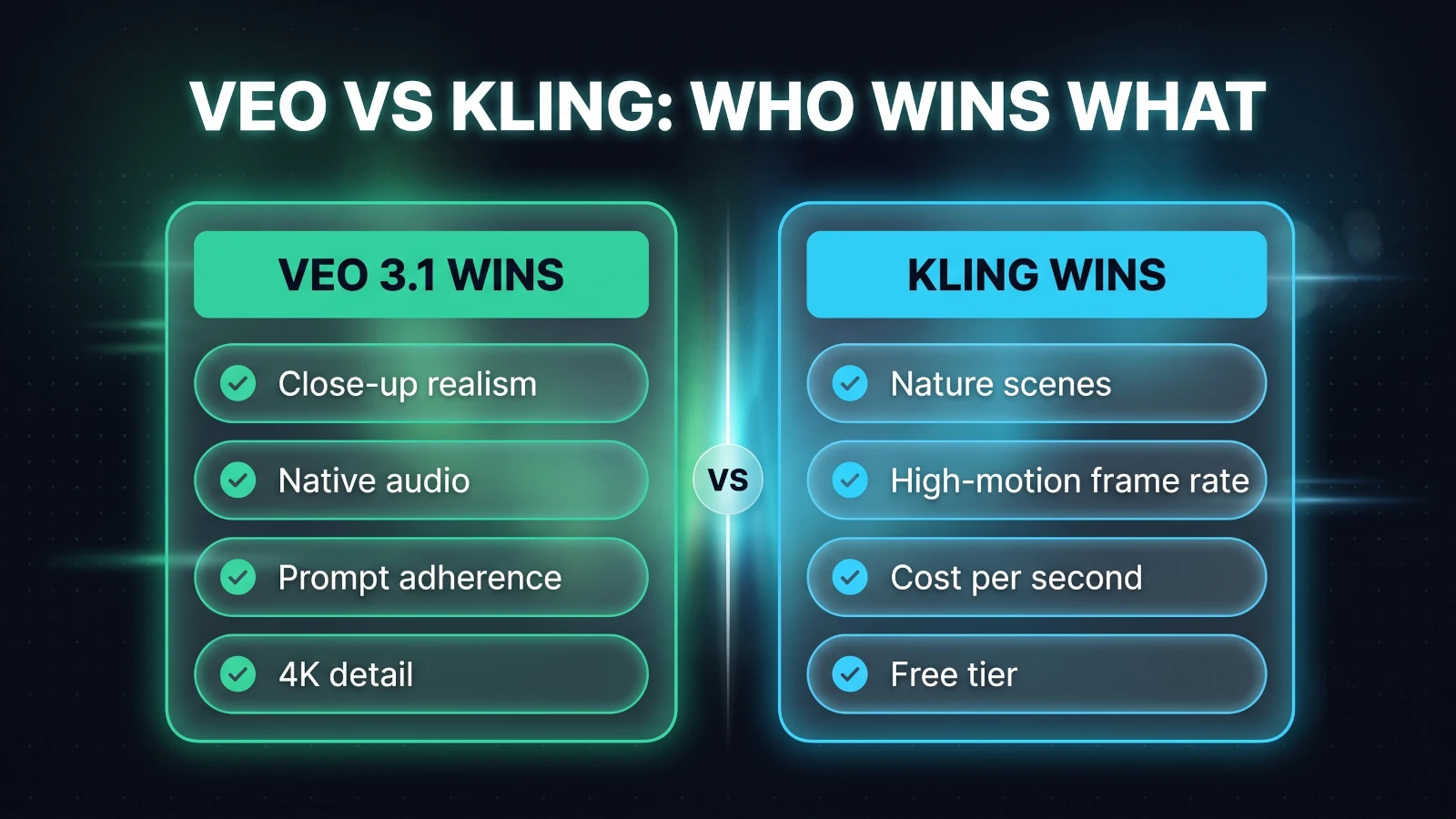
Its other standout is native audio. Veo generates synced dialogue, sound effects, and ambient noise in the same pass, and the lip sync is tight enough to pass on a first watch.
For anything client facing, a talking presenter, a polished ad, a product hero shot, that combination of realism and built-in sound is what makes Veo feel a tier above.
The fast mode is not a throwaway either. It costs a fraction of the quality mode and is perfect for drafting, so I block out a shot in fast mode and only spend the quality budget once the composition is right.
Veo is steady at image-to-video as well, so when I have a still I like, animating from it holds the composition instead of wandering off. Between that and its prompt accuracy, I simply waste fewer generations, and on a model this expensive per second, fewer rerolls is the real saving.
Where Veo still trips
Veo is not flawless, and pretending otherwise would make this a worse guide.
On very fast motion, a chase or complex movement, its frame rate can leave the action looking slightly soft where a higher frame rate model stays crisp.
I have also seen it crowd a wide landscape or group shot unless I am explicit about framing, so composition prompts matter more here than you would expect.
And the quality mode is genuinely expensive per second, so it rewards you for drafting cheaply first rather than iterating at full price.
None of that shakes it from the top of my list. It just means Veo is the specialist you call for realism and audio, not the one you throw every job at blindly.
Kling: the value pick, and my choice for nature
If Veo is the polished specialist, Kling is the workhorse that keeps surprising me for the money.
It is the model I reach for when the shot is a nature scene, and that is not a small niche.
In my testing, Kling renders foliage, water, and natural motion with a smoothness that looks convincing without heavy prompting, where other models need coaxing to avoid a plasticky look.
Wind through trees, a flowing river, a slow drift over a landscape: these are the shots where Kling quietly outperforms its price.
What Kling does better than its price suggests
Two technical strengths back up that impression.
The first is a higher frame rate, which is why Kling holds up on fast action where softer models blur. A running figure or a quick camera move keeps its detail.
The second is cost. Kling is meaningfully cheaper per second than the premium tier, and it offers a real free allowance, so it is the model you can afford to iterate on.
It has also grown up on consistency. Its multi-shot modes keep a character recognisable across several clips, which matters the moment you are stitching a sequence rather than making one shot.
For high-volume social content and short-form vertical clips, that mix of low cost and smooth motion makes Kling very hard to argue with.
Where Kling shows its limits
The trade off is realism at the extremes.
On tight, documentary-grade close-ups of faces, Kling trails Veo. Stylised and narrative footage looks great, but the last few percent of photoreal skin detail is not yet its strength.
So my rule with Kling is easy: lean on it for nature, motion, and value, and hand the close-up realism jobs to Veo.
A prompt template that travels across models
Whichever model you pick, the biggest quality gain is usually the prompt, not the tool.
The models that score highest on prompt adherence reward you for describing a shot the way a director would, in a fixed order.
Here is the skeleton I reuse across Veo and Kling, filling each part in:
[Shot type + lens]  wide establishing shot, 35mm
[Subject + action]  a lone hiker walking a ridgeline, slow steady pace
[Setting + time]    misty pine forest at golden hour
[Camera move]       slow push-in, gentle handheld feel
[Lighting + mood]   warm low sun, soft volumetric haze, calm
[Audio, if native]  ambient wind, distant birdsong, no music
Keep each line short and concrete, and change one variable at a time between generations.
That last habit matters more than any single word. When you alter one thing per attempt, you learn what the model responds to instead of guessing.
Text-to-video or image-to-video: where to start
There is one more choice that shapes your results before you even pick a model: whether you start from text or from an image.
Text-to-video is the fastest way to explore. You describe a shot and the model invents everything, which is perfect for finding ideas but harder to control precisely.
Image-to-video starts from a still you supply, usually as the first frame, and animates outward from there. You trade a little spontaneity for far more control over composition, character, and colour.
My habit is to use text-to-video to discover a look, then switch to image-to-video to lock it in. Once a frame is right, feeding it back keeps the model from drifting on the next generation.
This shapes model choice too. Kling and Seedance are especially strong at image-to-video, so if you already have a hero still, they are a natural home for it.
And when brand or character consistency is the goal, starting from a reference image beats re-describing the same person in words on every single clip.
Runway Gen-4.5: when control beats realism
Runway is the model I recommend the moment the job is less about raw realism and more about direction.
Its edge is a genuine toolkit: camera moves, a motion brush to steer specific parts of a frame, and reference-driven character consistency.
That control is why studios and agencies keep it in the pipeline for client work and VFX, where every frame is art directed and "close enough" is not the brief.
You give up a little of Veo's out-of-the-box photorealism, but you gain the ability to shape the shot deliberately rather than reroll the dice.
If your work is creative filmmaking, effects, or anything where you need to place and move elements on purpose, Runway is the specialist tool for that lane.
Sora 2: strong physics, but read this first
Sora 2 is genuinely impressive at the things it is known for: physics simulation, believable camera work, and experimental, narrative-driven shots.
For concepting a wild idea or a physically complex moment, it can still produce results the others struggle to match.
But here is the honest part most roundups skip. OpenAI has announced that the Sora web and app experiences are being discontinued in April 2026, and the API in September 2026.
That changes the advice completely. A model with a published end date is not something you build a repeatable workflow on.
So my take is narrow: enjoy Sora for one-off experiments if you have access, but do not standardise your pipeline around it, and do not learn it as your main tool this year.
This is exactly why I care about the boring durability questions as much as the flashy output. A brilliant tool you cannot rely on next quarter is a liability, not an asset.
Seedance and the rest, in one breath
A few more are worth knowing without a full section each.
Seedance has become the interesting pick for longer, cinematic image-to-video shots, with fast generation and strong movement, though access can be the catch.
Luma remains a friendly, capable option for quick creative clips, and Runway aside, most of the older names have either caught up or faded.
If you are just starting, you do not need any of these. Learn Veo and Kling well first, and only reach past them when a specific job asks for it.
Which AI video generator is best for what
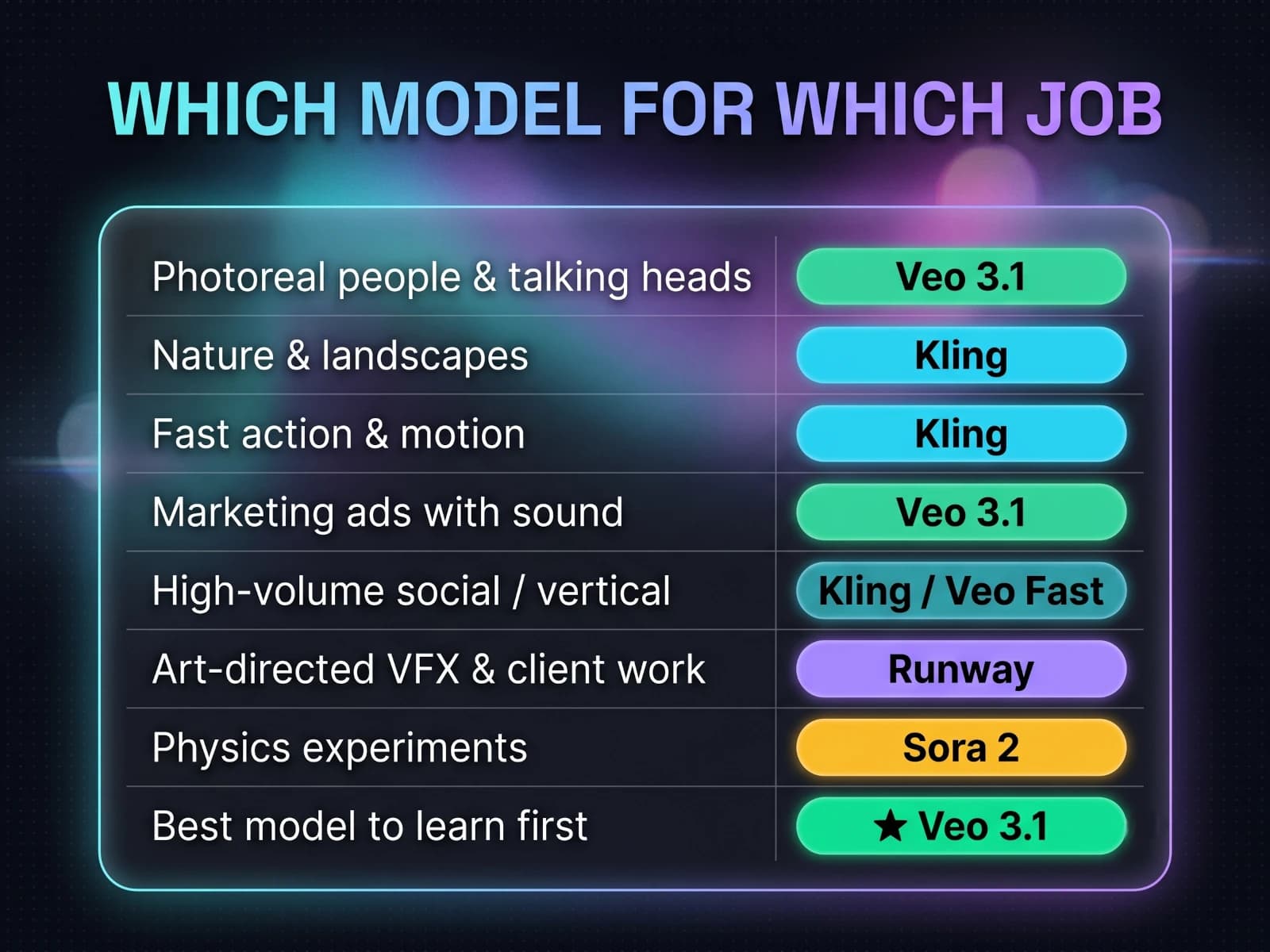
Here is the part to bookmark. This is my honest mapping of which video generation model is good for what, job by job.
- Photoreal people and talking heads: Veo 3.1, quality mode. Nothing else matches its faces and lip sync yet.
- Nature, landscapes, and organic motion: Kling. Smooth foliage and water at a price you can iterate on.
- Fast action and high-motion clips: Kling, for the frame rate that keeps movement sharp.
- Marketing and polished ads with sound: Veo 3.1, because native audio and realism land in one pass.
- High-volume social and short-form vertical: Kling or Veo fast mode, whichever fits your budget per clip.
- Art-directed VFX and client work: Runway Gen-4.5, for its control tooling.
- Physics-heavy experiments: Sora 2, but only as a throwaway, given the shutdown timeline.
- A single model to learn first: Veo 3.1, the most reliable all rounder.
Notice that no model appears in every row. That is the entire point, and it is why "best overall" is the wrong question to ask.
How to choose in about five minutes
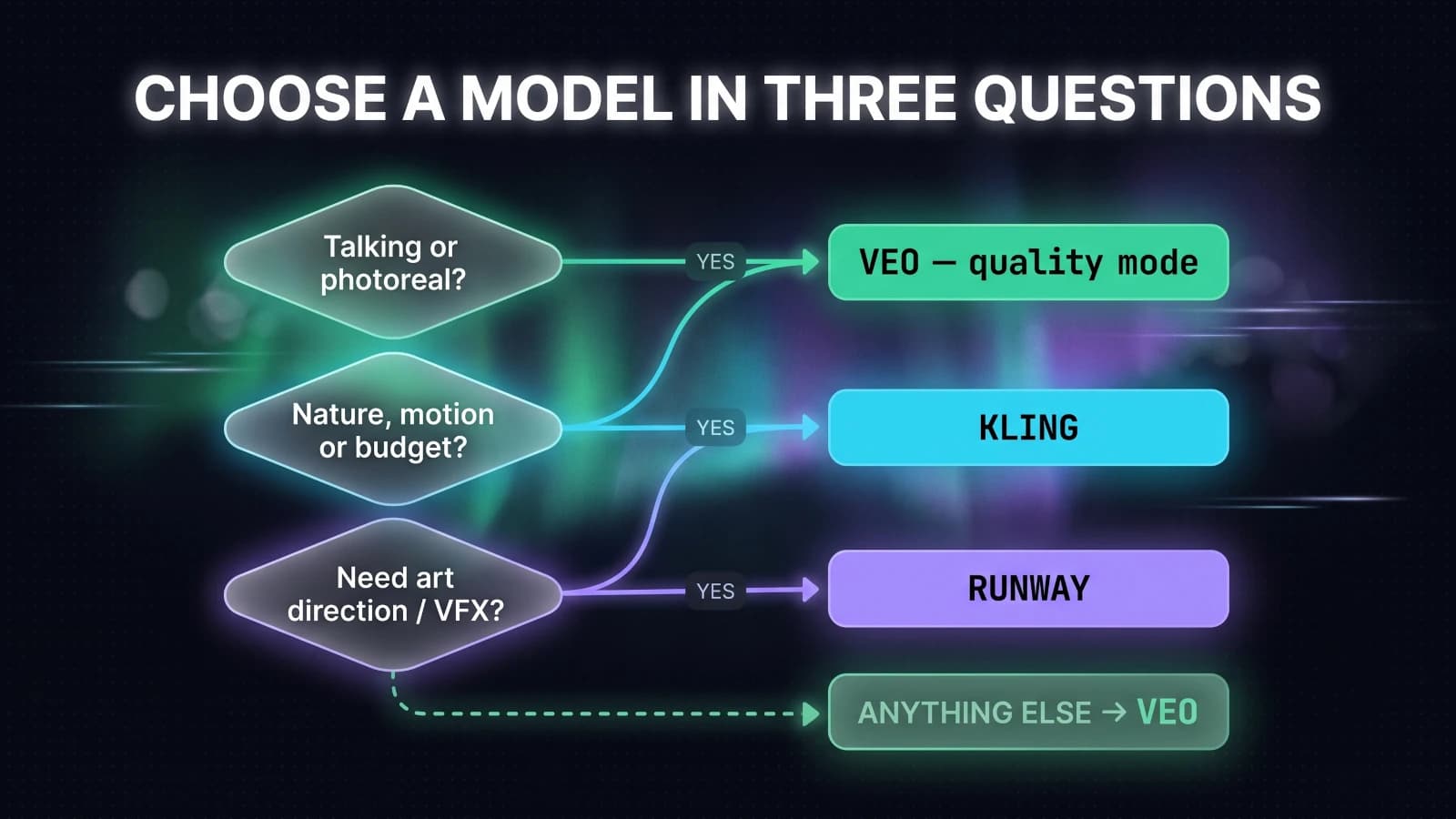
If a table still feels like a lot, you can get to the right model with three quick questions.
First, does the shot have a person talking, or need to look truly photoreal? If yes, use Veo in quality mode, and let its native audio do the sound too.
Second, is it nature, fast motion, or high volume on a budget? If yes, use Kling, and only switch to Veo if a close-up needs extra realism.
Third, do you need to art direct specific elements or add VFX? If yes, use Runway for its control, accepting slightly less out-of-the-box realism.
If none of those fit cleanly, default to Veo, draft in its fast mode, and finish in quality mode. That path fails gracefully more often than any other.
Match the model to the job, not to the hype, and most of the decision fatigue around AI video simply disappears.
What this actually costs
Cost is the deciding factor more often than quality, so it is worth being plain about it.
These models charge by the second of generated video, not by a flat monthly fee, and the spread is wide.
Kling and Veo's fast mode sit at the affordable end, roughly ten to fifteen cents per second, with Kling often cheaper again through third-party providers.
Veo's quality mode costs several times more per second, which is exactly why I draft cheaply and only spend the quality budget on shots that have already earned it.
The premium options climb from there, and that price is only worth paying when the job genuinely needs what they do best.
So the money question is never "which is cheapest overall." It is "which is the cheapest model that can actually do this shot?" Answer that and your bill takes care of itself.
The takeaway
There is no single best AI video generator, and anyone who tells you otherwise is selling a subscription.
There is only the best tool for the shot in front of you, and once you frame it that way the choice gets easy.
For me, Veo 3.1 is the reliable default, unbeaten on realism and native audio, and its quality model is where the polished work happens.
Kling is the value workhorse I trust for nature, motion, and anything high volume, and it punches well above its price.
Runway owns creative control, and Sora, for all its strengths, is not something to build on while it is being wound down.
Learn those first two deeply, keep the matrix above nearby, and you will pick the right model far more often than not.
This job-first sorting works beyond video too. It is exactly how I picked the best AI coding assistant for Java work, tested the same way.
If you want more of these hands-on notes as I test new tools, they live in my Generative AI writing, and a little about how I work is on my about page.
FAQ
- Which AI video generator is the most realistic?
- Google Veo 3.1 in its quality mode. It leads on close-up photorealism, prompt adherence, and native audio, so faces, skin texture, and lip sync hold up under a full-screen 4K view where other models start to look soft. Kling is close and very good, but on tight, documentary-grade close-ups Veo is still the one I trust first.
- Is Kling or Veo better for video generation?
- Neither wins outright, they win different jobs. Veo is better for realism, native audio, and prompt accuracy, so it is my default for anything with people or dialogue. Kling is better for value, high-motion action, and nature scenes, and its higher frame rate keeps fast movement crisp. If you can only learn one, Veo is the safer all-round pick; if budget or nature footage is the priority, Kling earns its place.
- What is the best AI video generator for nature and landscape videos?
- Kling. In my testing it renders foliage, water, and natural motion with a smoothness that looks convincing without heavy prompting, and it does it at a lower cost per second than the premium models. Reach for Veo instead only when the nature shot needs close-up realism or synced ambient audio baked in.
- Is Sora still worth using in 2026?
- Be careful building anything on it. OpenAI has said the Sora web and app experiences are being discontinued in April 2026 and the API in September 2026, so it is not a stable base for a workflow you plan to keep. The model still has genuinely strong physics and camera work, so it is fine for one-off experiments, but I would not standardise a pipeline on a product with a published end date.
- Which AI video model is the cheapest to use?
- Kling and Veo's fast mode are the value picks, both in the region of ten to fifteen cents per second of generated video, with Kling often cheaper through third-party providers. Veo's quality mode costs several times more per second, and premium options like Sora sit higher still. The right question is not which is cheapest overall, but which is cheapest for the shot you actually need.