
Ask a room of Java developers to name the best AI coding assistant for Java developers, and you will start a longer argument than any framework debate.
We spent months settling that argument the slow way: by putting the leading tools to work on real Spring Boot and Kafka services, not demo projects.
The honest conclusion is that the winner changes with the job in front of you. An assistant that flies through a fresh REST controller can flail on a tangled legacy migration.
So instead of a tier list, this is a field guide. Six tools, the backend jobs each one genuinely wins, and the rough edges the sales pages skip.
The quick verdict: the best AI coding assistant for each backend job
For readers who want the conclusion first, this is how we assign the work after months of daily use.
- Heavy multi-file changes and large-repo understanding: Claude Code.
- Staying inside IntelliJ IDEA with deep JVM awareness: JetBrains AI Assistant with Junie.
- Everyday autocomplete in any editor: GitHub Copilot.
- A fast, tight edit-and-review loop: Cursor.
- Upgrading old Java and Spring versions at scale: Amazon Q Developer.
- A locked-down, regulated, or air-gapped codebase: Tabnine.
Everything below is the evidence behind those picks, tool by tool, with the weak spots left in.
How we test an AI coding assistant before trusting it
A vendor demo proves very little, because the vendor picks the prompt. What matters is how a tool behaves on your own repository, under your conventions, on a deadline.
So every assistant here ran the same gauntlet of backend tasks. Scaffold a Spring Boot endpoint with its service and tests. Refactor a bloated service class. Trace a bug across several classes. Explain an unfamiliar module well enough to change it safely.
Those jobs stress the four things that decide real developer productivity: whole-repository awareness, multi-file consistency, test quality on the awkward branches, and how often the tool hallucinates an API that does not exist.
We also track the unglamorous numbers, generation speed and monthly cost, because an assistant you cannot afford to iterate with is one you quietly stop opening.
It mirrors how we approach any risky backend change: let the tooling clear the mechanical bulk, then verify everything that carries risk by hand.
Every claim below survived that filter: exercised on real work, checked against current pricing pages, and stripped of anything we could not reproduce.
The 2026 shortlist for Java backend work
Twelve months ago this space was a sprawl of half-finished plugins. It has since consolidated into a short list that most working Java teams now draw from daily.
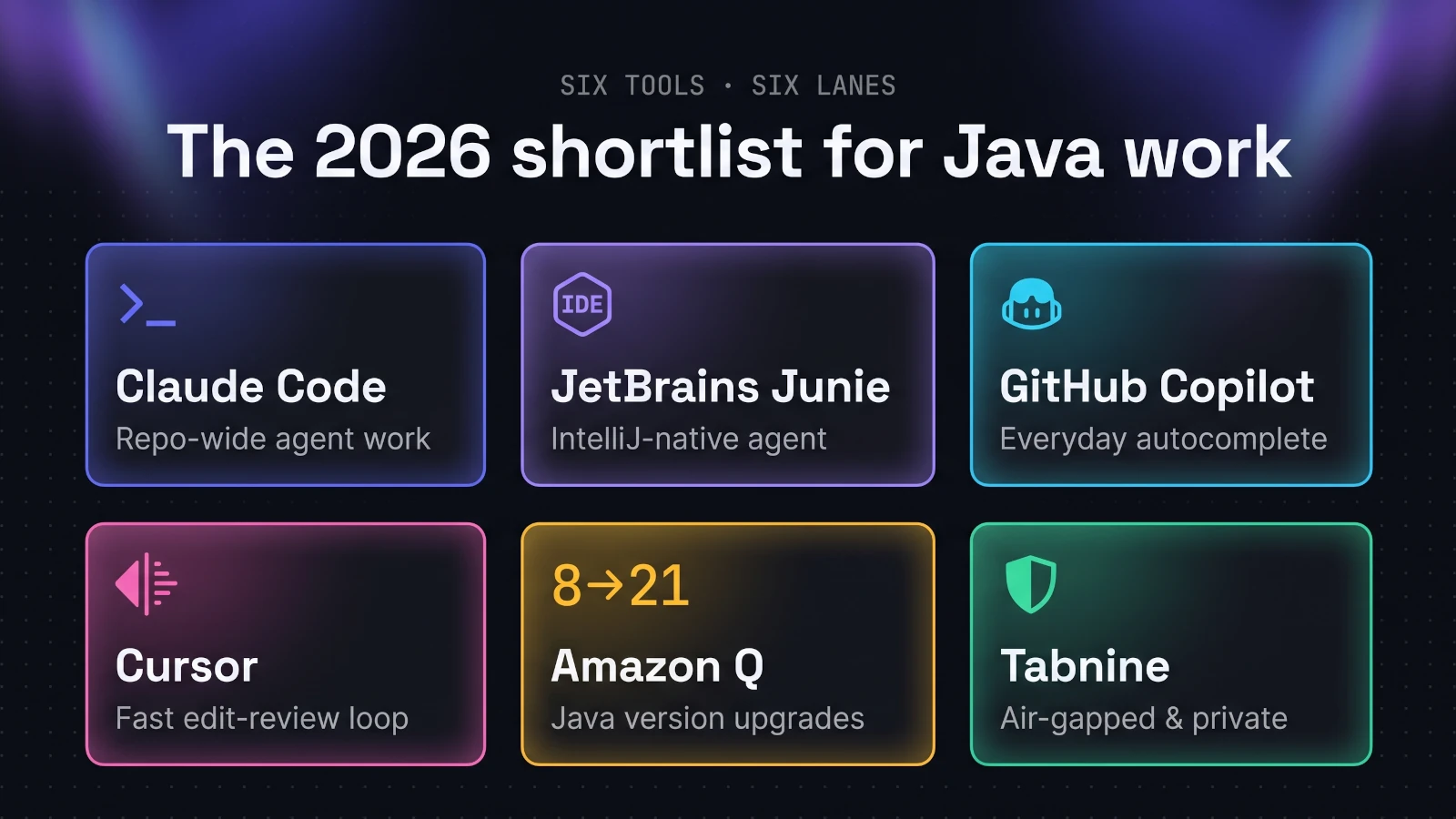
Three tools sit at the top for backend work: Claude Code from Anthropic, JetBrains AI Assistant with its Junie agent, and GitHub Copilot.
Around them sit three specialists. Cursor owns the fast editor loop, Amazon Q Developer owns Java version upgrades, and Tabnine owns the privacy and compliance lane.
What makes 2026 different is that these tools no longer compete head to head. They layer: inline code completion while you type, an agent for multi-file tasks, and a specialist for the jobs that need one.
Which is why "best overall" has become the wrong question. The useful question is which tool wins which job, and that is how the rest of this guide is organised.
Claude Code: the agent we hand the hard problems
Claude Code has become our default for anything heavier than a quick edit, for one reason: it reads the whole codebase before it touches a line.
Give it a task that spans a controller, a service, a repository, and their tests, and it maps how they relate, then makes one coordinated change across all of them.
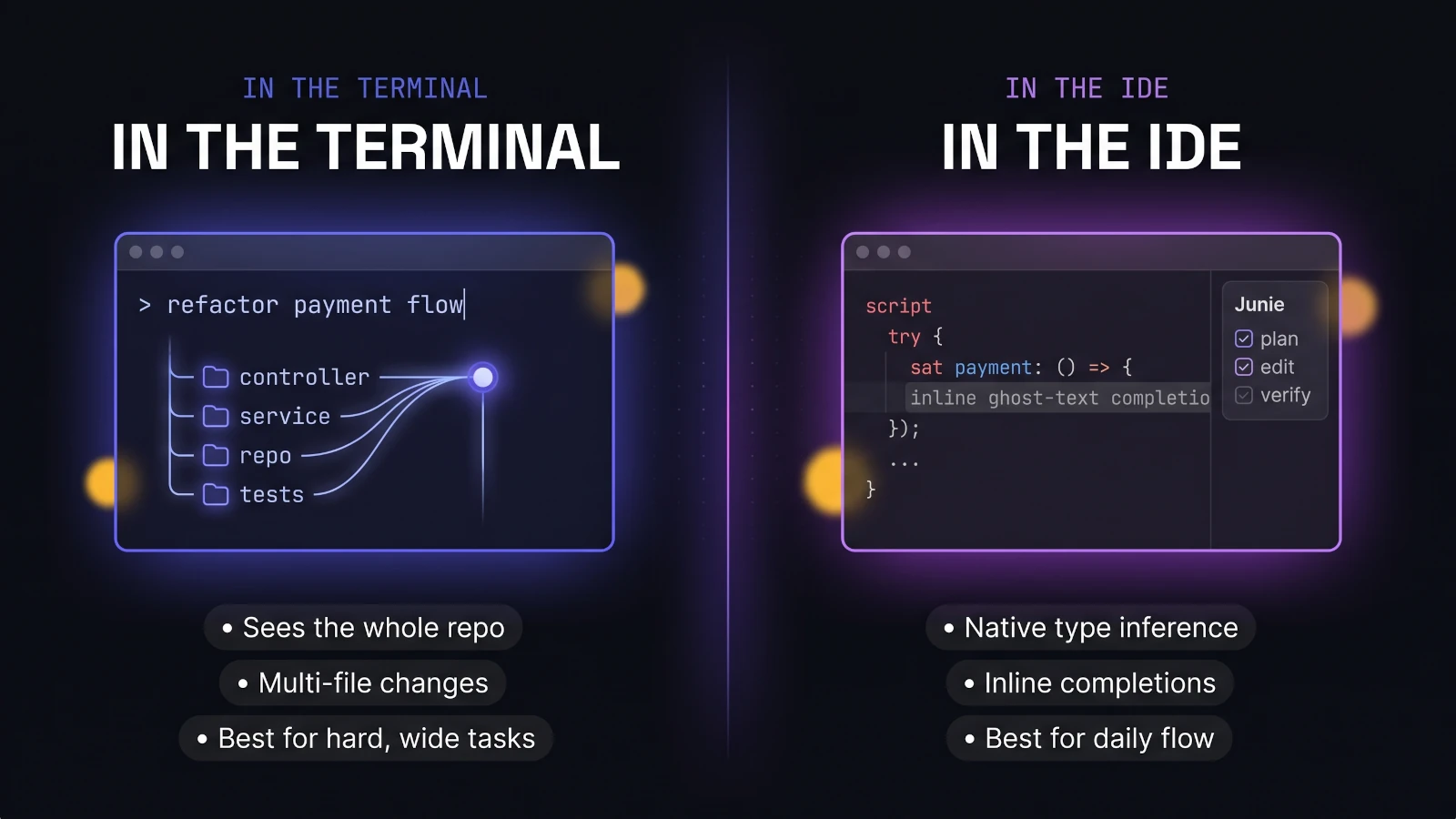
It lives in the terminal as a CLI-first coding agent rather than an editor plugin. That sounds like a quirk until you notice how much backend work already happens at the command line.
On raw capability it currently leads the pack: Anthropic's Opus 4.8 posts around 88.6% on SWE-bench Verified, the highest score recorded by a frontier model, backed by a very large context window.
What it gets right on a Spring Boot codebase
The standout skill is repository-scale reasoning. Point it at an unfamiliar Spring Boot service and it traces the architecture, explains the flow, and proposes changes that respect the patterns already in place.
That single ability compounds. You spend fewer prompts fighting the tool and more time reviewing a result that is already close to mergeable.
It is equally strong on the jobs backend engineers actually dread: multi-file refactors, unit test generation that covers the edge cases, and reading legacy code well enough to modify it safely.
On a payments or insurance system, where one careless edit ripples through five services, an assistant that sees all five at once is a different category of help.
The trade-offs we accept to use it
No honest guide skips the downsides, so here are Claude Code's.
Working in a terminal is a genuine adjustment when your muscle memory lives in an IDE, and there is no rich inline autocomplete as you type.
Costs can climb quickly under heavy agent use, so it rewards tightly scoped tasks over letting the agent wander an entire repository.
And like every large language model, it can still hallucinate a method or a configuration key, which is exactly why we read every diff before accepting it.
None of that moves it off the top of this list. It simply means Claude Code is the specialist for hard, wide problems, not the tool for a two-line tweak.
JetBrains AI Assistant and Junie: the IntelliJ-native pick
If your entire Java life happens inside IntelliJ IDEA, this is the assistant that fits your hands without changing how you work.
Its advantage is not a bigger model. It is integration: the AI plugs into the same type inference, refactoring engine, and code inspections that already make IntelliJ excellent at JVM code.
The difference shows in the suggestions. Because the IDE understands your Java and Kotlin structurally, completions read like they came from someone with your project open, not a generic model guessing at context.
Junie is the autonomous agent layered on top. Hand it a task and it plans the change, edits across files, runs verification, and presents the result for review, all without leaving the editor.
You can switch between the current GPT, Claude, and Gemini frontier models mid-conversation, and there is local model support through Ollama and LM Studio for offline or sensitive work.
The pricing is friendly to try: a free tier with unlimited local completions, a Pro plan around $10 a month, and an Ultimate tier near $30 for heavier cloud usage.
The honest trade-off is ecosystem lock-in, and for the very largest agentic tasks we still drop to Claude Code. For daily Java development that stays in the IDE, though, nothing else fits as naturally.
GitHub Copilot: the accessible default
GitHub Copilot popularised the phrase AI pair programmer, and it remains the easiest recommendation for anyone who wants help without rethinking their setup.
Its superpower is ubiquity. It runs inside IntelliJ, VS Code, and nearly every editor a Java team already uses, watching your open files to match the project's conventions as you type.
As everyday code completion it is still excellent. It finishes the boilerplate, the getters, and the obvious next line, fast enough to feel invisible.
It has grown beyond completion too. Agent mode now handles multi-step tasks, and Copilot carries the most mature enterprise controls on this list, with proper SSO, audit logs, and organisation-wide policy.
For a regulated company that needs governance before raw power, that maturity often decides the purchase, not benchmark scores.
Pricing moved to a usage-based AI credits model in 2026: Copilot Pro is $10 a month with a credit allowance, Pro+ sits near $39, and a Max plan reaches $100 for heavy use.
Depth is where it runs out. On a genuinely large refactor or an unfamiliar architecture, it does not reason across the repository the way a dedicated agent does.
Our rule of thumb is simple: Copilot for the fast inline flow, a heavier agent for the hard problems.
Cursor: when the edit-and-review loop matters
Cursor is a fork of VS Code rebuilt around AI, and its whole personality is the loop: type, generate, review a clean visual diff, accept or reject, repeat.
That tight feedback cycle makes iterative editing genuinely pleasant, and its inline autocomplete ranks among the best available.
For backend Java it is very capable, though its centre of gravity leans toward front-end and full-stack work, where the rapid visual loop pays off most.
Pricing starts at $20 a month for Pro, and Cursor's own documentation is refreshingly honest that daily agent users typically land nearer $60 to $100 once usage adds up.
If your day is mostly editing code you already understand, Cursor's loop is hard to beat. We reach past it when the job is comprehension across a sprawling service rather than speed.
Amazon Q Developer: the Java upgrade specialist
Most tools here are generalists. Amazon Q Developer earns its place by being the opposite.
Its headline capability for Java teams is code transformation: automated Java version upgrades at a depth no general-purpose assistant matches.
It covers Java 8 to 17, 8 to 21, 11 to 17, 11 to 21, and 17 to 21, rewrites deprecated APIs to their modern equivalents, and bumps common libraries and frameworks to compatible versions in the same pass.
A newer selective transformation mode adds steering: the CLI produces an upgrade plan, and you reply in plain language to skip steps or pin specific dependency versions.
Anyone who has nursed a sprawling Java 8 application onto a modern LTS by hand knows exactly how much tedious, error-prone work that removes.
It naturally fits AWS-centric Java applications best, and it is less a daily companion than a power tool you bring out when legacy modernization is the task. For that one task, it is the first tool we would reach for.
The philosophy matches what we learned doing a Spring Boot 3 to 4 upgrade manually: let automation clear the mechanical bulk, then verify every change that carries real risk.
Tabnine: for the locked-down, regulated codebase
Some organisations will never let source code leave the building, and that single constraint eliminates most of this list. Tabnine is built for exactly that world.
Its pitch is control. Tabnine never trains on your code, never retains it after inference, and never shares it, with SOC 2, GDPR, and ISO 27001 behind those promises.
Deployment is the real differentiator. Alongside the usual cloud option it offers on-premises and fully air-gapped installs that need no internet connection at all, which remains rare among AI coding assistants.
Under the hood it runs a hybrid: a fast local model for instant line completions, and a larger private or cloud model for heavier code generation and chat.
Its context engine maps your organisation's own repositories, so suggestions follow your real conventions rather than generic open-source patterns.
For payments, insurance, or anything under a compliance regime, that mix of privacy and governance can outweigh a few points of raw model quality. When the constraint is where the code is allowed to go, Tabnine is the answer.
How we brief an assistant, whichever tool it is
Across all six tools, the biggest quality lever is not the logo. It is how clearly you brief the model.
These assistants behave like capable junior engineers: they do their best work when you hand over the context, the constraints, and the definition of done, in that order.
This is the skeleton we reuse across Claude Code, Junie, and Copilot, filling each part in:
[Context]     this is a Spring Boot 3 service using constructor injection and JPA
[Task]        add a POST /orders endpoint with a service method and validation
[Constraints] follow the existing controller pattern, no new dependencies
[Tests]       write unit tests covering the happy path and a validation failure
[Done when]   the tests pass and the code matches the style of OrderController
Keep every line concrete, then adjust a single variable between attempts. That habit teaches you what the model actually responds to, instead of leaving you guessing in the dark.
And regardless of how clean the output looks, review every line before you accept it. The assistant drafts; the engineer still signs off.
Where every assistant still falls short on backend work
A fair guide also draws the ceiling, so here is where all six tools stop being trustworthy.
They are excellent at local correctness and weak at global judgement. An assistant will write a clean method while missing that it just introduced a subtle race condition across two services.
Distributed systems reasoning is where we trust them least. Idempotency, retries, ordering guarantees in Kafka, and transaction boundaries need a human who understands the business, not a plausible-looking suggestion.
They also default to the common pattern, which is usually right and occasionally dangerous. On security-sensitive code, a familiar shape can be subtly wrong for your specific threat model.
And each one can still hallucinate a method, a config key, or a library version, especially against a fast-moving framework. A green compile is reassurance, not proof.
The trap worth naming is automation bias: accepting a confident diff because reviewing it feels more tiring than trusting it.
Our line is firm. Hand the assistant the mechanical, well-trodden eighty percent, and keep the architecture, the edge cases, and anything a user's money touches in human hands.
Framed that way, the tools are pure upside. You collect the speed without inheriting the risk.
Which AI coding assistant is best for which job
This is the section to bookmark: every backend job from this guide, mapped to the tool that earned it.
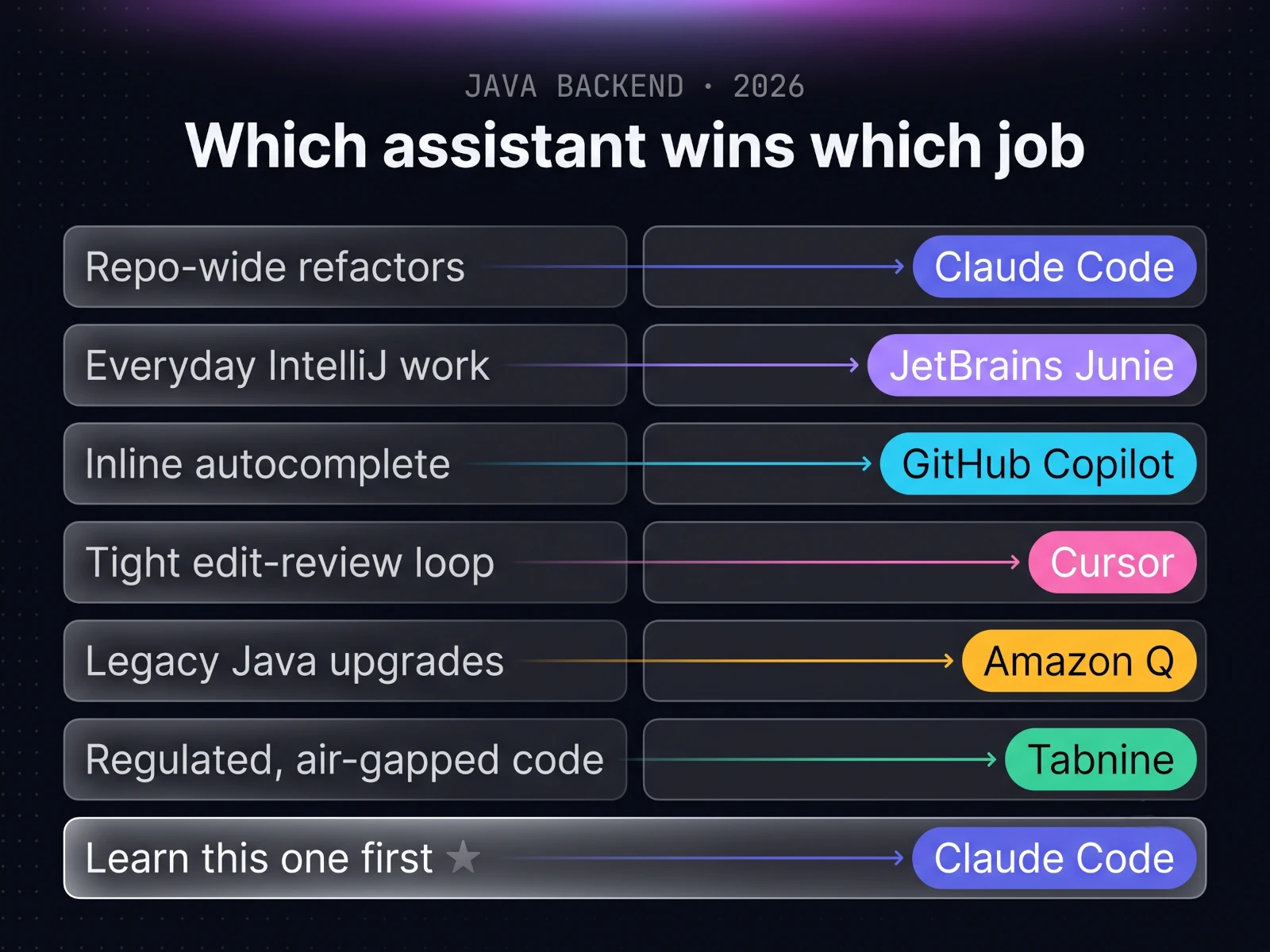
- Repo-wide refactors and reading unfamiliar code: Claude Code, for whole-repository reasoning.
- Everyday work inside IntelliJ: JetBrains AI Assistant with Junie, for deep JVM integration.
- Fast inline autocomplete in any editor: GitHub Copilot, for reach and low friction.
- A tight type, diff, accept edit loop: Cursor, for its review-first workflow.
- Upgrading legacy Java and its dependencies: Amazon Q Developer, the migration specialist.
- Private, regulated, or air-gapped code: Tabnine, for privacy and on-prem control.
- The single tool to learn first for backend Java: Claude Code, the most capable all-rounder.
No tool wins every row, and that is the real finding. The moment you stop hunting for one champion, the decision becomes mechanical.
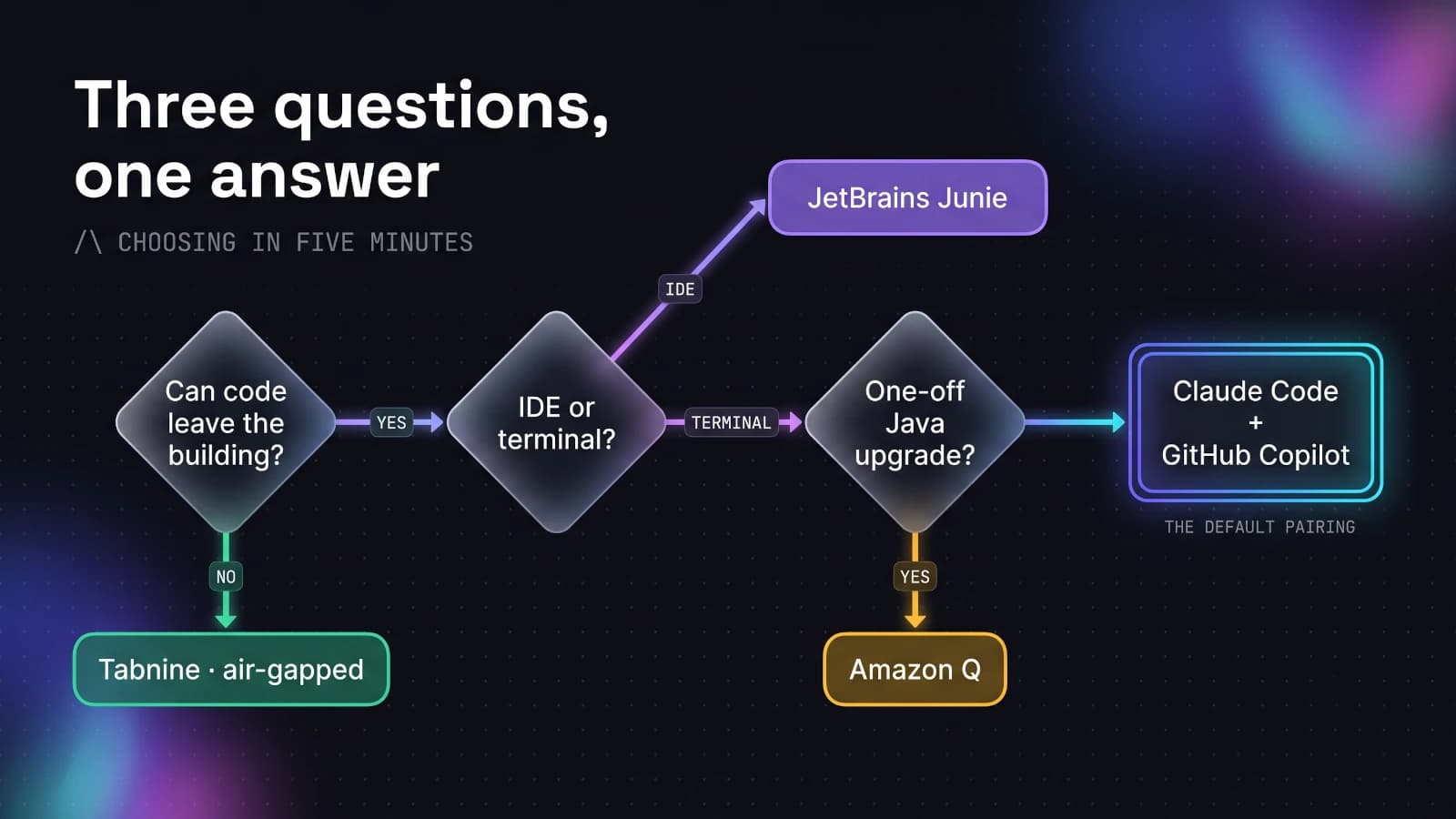
Three questions that settle the choice
If the matrix is still more than you need, three questions get you to the right tool in a few minutes.
First, is your code allowed to leave the building? If not, start with Tabnine and its air-gapped deployment, and stop reading here.
Second, do you live in the IDE or the terminal? IntelliJ devotees should take JetBrains AI with Junie. If you are comfortable at the command line and the tasks are big, take Claude Code.
Third, is this a one-off modernization project? For upgrading Java versions across a large application, run Amazon Q Developer for that job, then return to your daily tool.
When none of those apply, pair Claude Code for the hard problems with GitHub Copilot for inline speed. That combination degrades the most gracefully as your tasks change.
The real cost of each AI coding assistant
Budget settles more of these decisions than benchmarks do, so here are the numbers without the softening.
Entry pricing clusters tightly. GitHub Copilot and JetBrains AI start around $10 a month, while Claude Code, Cursor, and most serious tiers converge on $20.
The sticker price is not the real bill, though. The heavier tools now run usage-based pricing, so an agent working all day on a large repository can climb well past its headline tier.
Cursor publishing $60 to $100 a month as the realistic range for daily agent users is the honest shape of it, and the top Claude Code and Copilot plans reach $100 to $200 for the same reason.
The free tiers have real substance now too. JetBrains AI and Copilot both offer free plans that genuinely cover learning and light work.
So never ask which tool is cheapest overall. Ask which is the cheapest tool that can do the job in front of you, and the bill takes care of itself.
tip
One habit keeps the spend sane: draft and explore on a free or low tier, and reserve the expensive agent budget for tasks that have earned it, like a wide refactor or a gnarly bug. Rerolling prompts on premium tools is where the money quietly disappears.
Our verdict for Java developers
There is no single best AI coding assistant for Java developers. There is a best assistant per job, and that reframing dissolves most of the decision fatigue.
For us, Claude Code is the trusted default for anything hard or wide, and it is where the serious backend work happens.
JetBrains AI with Junie wins everything that stays inside IntelliJ, Copilot wins the everyday autocomplete, and Amazon Q and Tabnine each own a lane nobody else serves properly.
We apply the same job-first sorting to every AI category we test, including which AI video generator fits which shot. The method outlasts any single tool.
Learn one general tool deeply, keep the job matrix nearby, and hold on to the rule that survives every model release: the assistant drafts, the engineer signs off.
More hands-on notes like this live in our AI-assisted development section, with the deeper systems work in backend engineering. Who runs these tests is on the about page.
FAQ
- What is the best AI coding assistant for Java developers?
- There is no single winner, but for most backend Java work we reach for Claude Code first, because it reads a whole Spring Boot repository, understands how the modules relate, and makes coordinated multi-file changes. If you live inside IntelliJ IDEA, JetBrains AI Assistant with the Junie agent is the strongest in-editor choice, since it plugs into the same type inference and refactoring engine that already understands your JVM code. Pick Claude Code for heavy agentic work in the terminal, and JetBrains for everything you want to keep inside the IDE.
- Is Claude Code or GitHub Copilot better for backend development?
- Each one earns its keep on a different task. Claude Code is the stronger agent for large multi-file changes, refactors, and understanding an unfamiliar codebase, and Anthropic's Opus 4.8 posts the highest SWE-bench Verified score of any frontier model. GitHub Copilot is the more convenient day-to-day autocomplete, has the widest IDE support, and by far the most mature enterprise controls for SSO, audit logs, and policy. Many backend teams run both: Copilot for inline completion in the editor, Claude Code in the terminal for the hard problems.
- What is the best AI tool for Spring Boot?
- Spring Boot is one of the easiest frameworks for AI to get right, because so much of it is predictable: constructor injection, JPA repositories, REST controllers, and application properties. Claude Code and JetBrains Junie both handle those patterns cleanly across multiple files. For upgrading an old Spring Boot or Java version specifically, Amazon Q Developer's code transformation is the specialist tool, since it was built for Java 8 to 17 and 21 migrations.
- Which AI coding assistant is best for upgrading old Java versions?
- Amazon Q Developer. Its Java upgrade transformation supports Java 8 to 17, 8 to 21, 11 to 17, 11 to 21, and 17 to 21, updates deprecated APIs, and bumps common libraries to compatible versions in the same pass. A newer selective transformation mode lets you steer the plan in the CLI and pin specific dependency versions. No general assistant matches it for legacy Java modernization at scale.
- Can I trust an AI coding assistant with a private or regulated codebase?
- Only after you check the data policy, and only if you still review every change. For regulated backends like payments or insurance, Tabnine is the safest option, because it never trains on your code, never retains it after inference, and offers a fully air-gapped deployment that needs no internet at all. Whatever you use, treat generated code as a draft from a fast junior engineer: read it, run the tests, and never merge what you have not verified.
- Do I need to pay for an AI coding assistant, or is the free tier enough?
- The free tiers are genuinely usable for learning and light work. JetBrains AI Assistant now has a free plan with unlimited local completions, and GitHub Copilot has a free tier with limited monthly usage. You start paying when you want a capable agent working across your whole repository: Claude Code Pro is $20 a month, Copilot Pro is $10, and JetBrains Pro is $10. Heavy daily agent use on any of them realistically runs higher once usage-based pricing kicks in.